Get certified for free when you join Fabric Data Days 2026 and dive into Fabric, Power BI, SQL, AI, and other essential data skills.
Join nowJuly 7 - July 17 | Round 2 of the Power BI Dataviz World Championships. Don't miss your chance! Learn more
I'm importing multiple Excel files saved in one SharePoint folder. The files themselves are from BluJay which isn't a connectable source so I save as .xlsx on SharePoint. The files are all same format and I want to remove the top 9 rows from each file. I am able to connect the data source and combine the files but am unable to remove the top rows from each file after combining, it only removes the top rows from the first file.
Is it possible to do in the query editor or is it better to remove the rows in Excel after exporting from BluJay? Thanks.
Solved! Go to Solution.
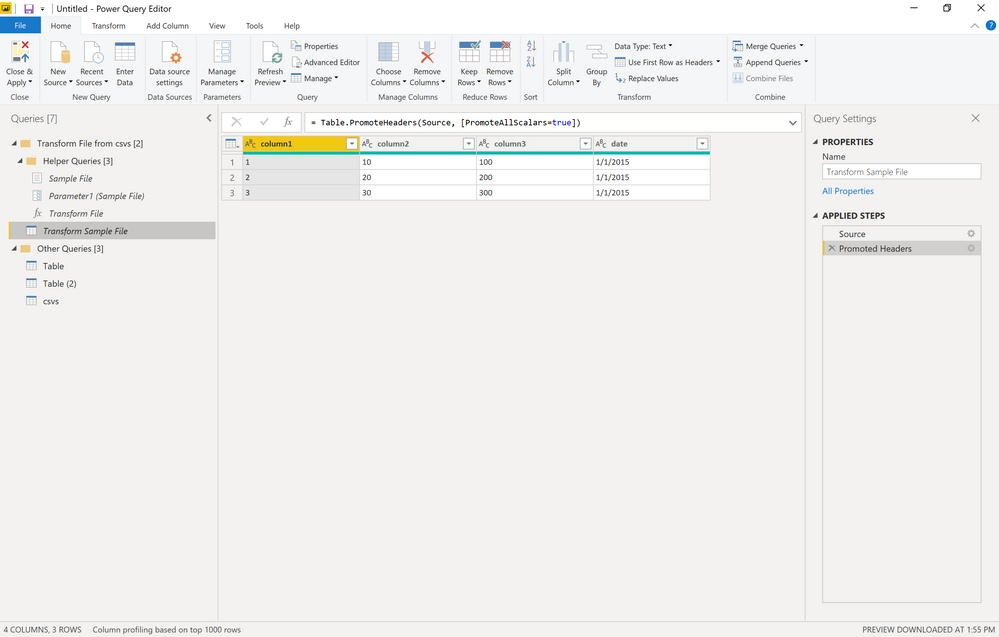
If you are using a Folder query, you need to edit the "Transform Sample File" query. You would remove your rows there and then it will take effect for the rest of the files.
tx!
Thank you!
Join us in Barcelona for FabCon and SQLCon, the Fabric, Power BI, SQL, and AI community event. Save €200 with code FABCMTY200.
Join Data Days 2026: 60 days of free live/on-demand sessions, challenges, study groups, and certification opportunities.