Join us at FabCon Atlanta from March 16 - 20, 2026, for the ultimate Fabric, Power BI, AI and SQL community-led event. Save $200 with code FABCOMM.
Register now!The Power BI Data Visualization World Championships is back! It's time to submit your entry. Live now!
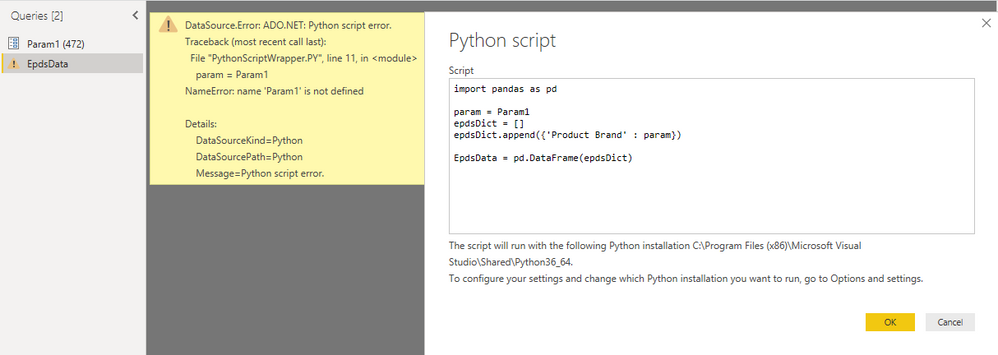
I wan't to use Python Script to query a web api, by a Parameter. How do I reference a Parameter from with a Python Script?
Problem is simplified underneath.
Solved! Go to Solution.
Hi @HenrikHulstrøm ,
Sorry for that, I'm not familar with Python script.
Please refer to this script. As the variable should be text value, we need translate the parameter as text type.
let
Source = Table.FromRows(Json.Document(Binary.Decompress(Binary.FromText("i45WMlSK1YlWMgKTxkqxsQA=", BinaryEncoding.Base64), Compression.Deflate)), let _t = ((type text) meta [Serialized.Text = true]) in type table [Column1 = _t]),
#"Changed Type" = Table.TransformColumnTypes(Source,{{"Column1", type text}}),
#"Run Python script" = Python.Execute("# 'dataset' holds the input data for this script#(lf)import pandas as pd#(lf)#(lf)param="&Text.From(Param1)&"#(lf)epdsDict=[]#(lf)epdsDict.append({'Product Brand': param})#(lf)Table= pd.DataFrame(epdsDict)",[dataset=#"Changed Type"])
in
#"Run Python script"
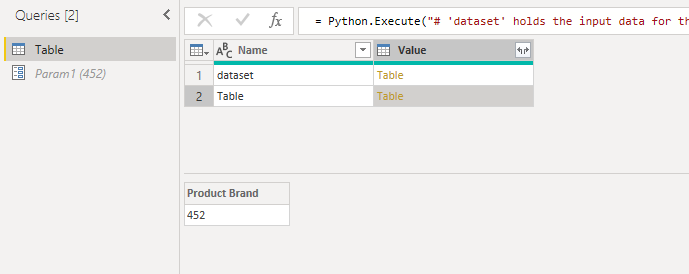
Here is the output.
Best Regards,
Cherry
Hi @HenrikHulstrøm ,
By my tests and research, I'm afraid that your syntax of referencing parameter is incorrect.
Please try the code below.
import pandas as pd param= '"&Param1&"' EpdsDict=[] ...... ......
Best Regards,
Cherry
Hi Cherry - thanks for helping.
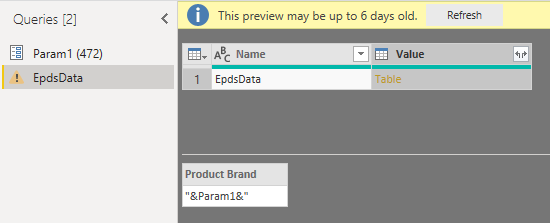
Your suggest will not read out the value '472', but assign &Param1& to variable param.
Hi @HenrikHulstrøm ,
Sorry for that, I'm not familar with Python script.
Please refer to this script. As the variable should be text value, we need translate the parameter as text type.
let
Source = Table.FromRows(Json.Document(Binary.Decompress(Binary.FromText("i45WMlSK1YlWMgKTxkqxsQA=", BinaryEncoding.Base64), Compression.Deflate)), let _t = ((type text) meta [Serialized.Text = true]) in type table [Column1 = _t]),
#"Changed Type" = Table.TransformColumnTypes(Source,{{"Column1", type text}}),
#"Run Python script" = Python.Execute("# 'dataset' holds the input data for this script#(lf)import pandas as pd#(lf)#(lf)param="&Text.From(Param1)&"#(lf)epdsDict=[]#(lf)epdsDict.append({'Product Brand': param})#(lf)Table= pd.DataFrame(epdsDict)",[dataset=#"Changed Type"])
in
#"Run Python script"
Here is the output.
Best Regards,
Cherry
I found the solution. Please like my post:
param='"&Text.From(Param1)&"'
note the single quotes.
| User | Count |
|---|---|
| 20 | |
| 10 | |
| 8 | |
| 8 | |
| 7 |