This time we’re going bigger than ever. Fabric, Power BI, SQL, AI and more. We're covering it all. You won't want to miss it.
Learn moreDid you hear? There's a new SQL AI Developer certification (DP-800). Start preparing now and be one of the first to get certified. Register now
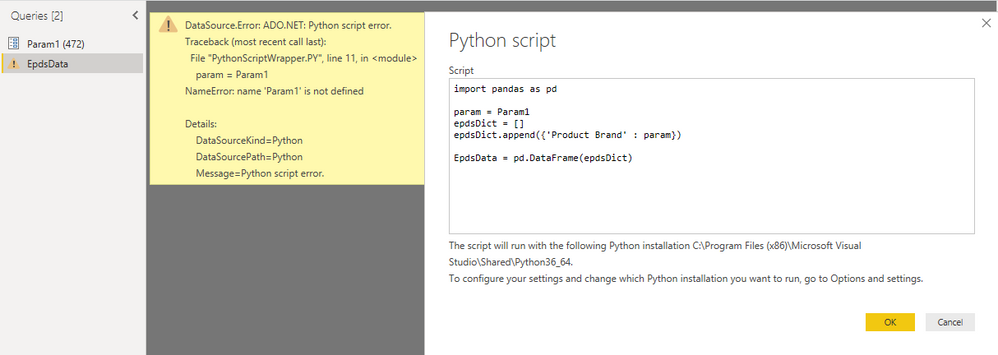
I wan't to use Python Script to query a web api, by a Parameter. How do I reference a Parameter from with a Python Script?
Problem is simplified underneath.
Solved! Go to Solution.
Hi @HenrikHulstrøm ,
Sorry for that, I'm not familar with Python script.
Please refer to this script. As the variable should be text value, we need translate the parameter as text type.
let
Source = Table.FromRows(Json.Document(Binary.Decompress(Binary.FromText("i45WMlSK1YlWMgKTxkqxsQA=", BinaryEncoding.Base64), Compression.Deflate)), let _t = ((type text) meta [Serialized.Text = true]) in type table [Column1 = _t]),
#"Changed Type" = Table.TransformColumnTypes(Source,{{"Column1", type text}}),
#"Run Python script" = Python.Execute("# 'dataset' holds the input data for this script#(lf)import pandas as pd#(lf)#(lf)param="&Text.From(Param1)&"#(lf)epdsDict=[]#(lf)epdsDict.append({'Product Brand': param})#(lf)Table= pd.DataFrame(epdsDict)",[dataset=#"Changed Type"])
in
#"Run Python script"
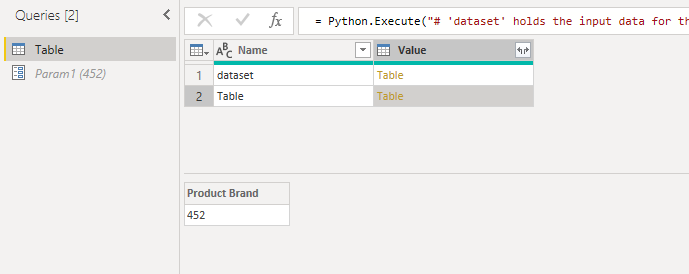
Here is the output.
Best Regards,
Cherry
Hi @HenrikHulstrøm ,
By my tests and research, I'm afraid that your syntax of referencing parameter is incorrect.
Please try the code below.
import pandas as pd param= '"&Param1&"' EpdsDict=[] ...... ......
Best Regards,
Cherry
Hi Cherry - thanks for helping.
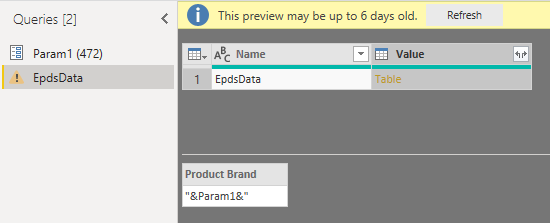
Your suggest will not read out the value '472', but assign &Param1& to variable param.
Hi @HenrikHulstrøm ,
Sorry for that, I'm not familar with Python script.
Please refer to this script. As the variable should be text value, we need translate the parameter as text type.
let
Source = Table.FromRows(Json.Document(Binary.Decompress(Binary.FromText("i45WMlSK1YlWMgKTxkqxsQA=", BinaryEncoding.Base64), Compression.Deflate)), let _t = ((type text) meta [Serialized.Text = true]) in type table [Column1 = _t]),
#"Changed Type" = Table.TransformColumnTypes(Source,{{"Column1", type text}}),
#"Run Python script" = Python.Execute("# 'dataset' holds the input data for this script#(lf)import pandas as pd#(lf)#(lf)param="&Text.From(Param1)&"#(lf)epdsDict=[]#(lf)epdsDict.append({'Product Brand': param})#(lf)Table= pd.DataFrame(epdsDict)",[dataset=#"Changed Type"])
in
#"Run Python script"
Here is the output.
Best Regards,
Cherry
I found the solution. Please like my post:
param='"&Text.From(Param1)&"'
note the single quotes.
Check out the April 2026 Power BI update to learn about new features.
Sign up to receive a private message when registration opens and key events begin.
If you have recently started exploring Fabric, we'd love to hear how it's going. Your feedback can help with product improvements.