cancel
Showing results for 
Search instead for 
Did you mean: 

July 7 - July 17 | Round 2 of the Power BI Dataviz World Championships. Don't miss your chance! Learn more

Reply
HenrikHulstrøm
Frequent Visitor

Reference Parameter from within Python Script

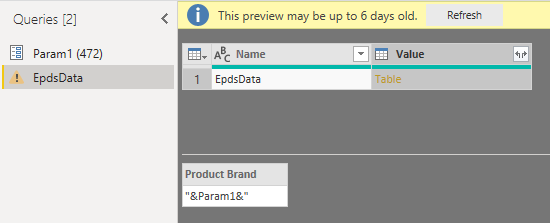
I wan't to use Python Script to query a web api, by a Parameter. How do I reference a Parameter from with a Python Script?

Problem is simplified underneath.


CaputeParameter.PNG

1 ACCEPTED SOLUTION

Hi @HenrikHulstrøm ,

Sorry for that, I'm not familar with Python script.

Please refer to this script. As the variable should be text value, we need translate the parameter as text type.

let
    Source = Table.FromRows(Json.Document(Binary.Decompress(Binary.FromText("i45WMlSK1YlWMgKTxkqxsQA=", BinaryEncoding.Base64), Compression.Deflate)), let _t = ((type text) meta [Serialized.Text = true]) in type table [Column1 = _t]),
    #"Changed Type" = Table.TransformColumnTypes(Source,{{"Column1", type text}}),
    #"Run Python script" = Python.Execute("# 'dataset' holds the input data for this script#(lf)import pandas as pd#(lf)#(lf)param="&Text.From(Param1)&"#(lf)epdsDict=[]#(lf)epdsDict.append({'Product Brand': param})#(lf)Table= pd.DataFrame(epdsDict)",[dataset=#"Changed Type"])
in
    #"Run Python script"

Here is the output.
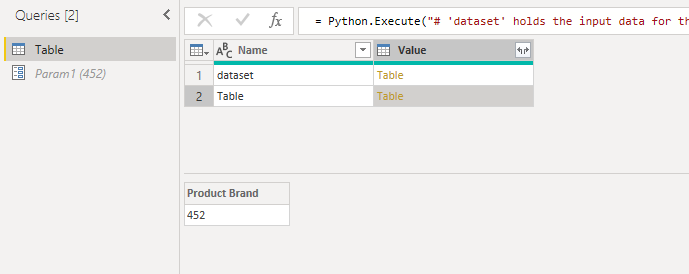
output.PNG

Best Regards,

Cherry

Community Support Team _ Cherry Gao
If this post helps, then please consider Accept it as the solution to help the other members find it more quickly.

View solution in original post

4 REPLIES 4
v-piga-msft
Resident Rockstar
Resident Rockstar

Hi @HenrikHulstrøm ,

By my tests and research, I'm afraid that your syntax of referencing parameter is incorrect.

Please try the code below.

import pandas as pd
param= '"&Param1&"'
EpdsDict=[]
......
......

Best  Regards,

Cherry


Community Support Team _ Cherry Gao
If this post helps, then please consider Accept it as the solution to help the other members find it more quickly.

Hi Cherry - thanks for helping.


Your suggest will not read out the value '472', but assign &Param1& to variable param.
CaptureParameter1.PNG


Hi @HenrikHulstrøm ,

Sorry for that, I'm not familar with Python script.

Please refer to this script. As the variable should be text value, we need translate the parameter as text type.

let
    Source = Table.FromRows(Json.Document(Binary.Decompress(Binary.FromText("i45WMlSK1YlWMgKTxkqxsQA=", BinaryEncoding.Base64), Compression.Deflate)), let _t = ((type text) meta [Serialized.Text = true]) in type table [Column1 = _t]),
    #"Changed Type" = Table.TransformColumnTypes(Source,{{"Column1", type text}}),
    #"Run Python script" = Python.Execute("# 'dataset' holds the input data for this script#(lf)import pandas as pd#(lf)#(lf)param="&Text.From(Param1)&"#(lf)epdsDict=[]#(lf)epdsDict.append({'Product Brand': param})#(lf)Table= pd.DataFrame(epdsDict)",[dataset=#"Changed Type"])
in
    #"Run Python script"

Here is the output.

output.PNG

Best Regards,

Cherry

Community Support Team _ Cherry Gao
If this post helps, then please consider Accept it as the solution to help the other members find it more quickly.

I found the solution. Please like my post: 


param='"&Text.From(Param1)&"'

note the single quotes.  

Helpful resources

Announcements
FabCon and SQLCon Barcelona 2026

FabCon & SQLCon – Barcelona 2026

Join us in Barcelona for FabCon and SQLCon, the Fabric, Power BI, SQL, and AI community event. Save €200 with code FABCMTY200.

60 days of Data Days Carousel

Data Days 2026

Join Data Days 2026: 60 days of free live/on-demand sessions, challenges, study groups, and certification opportunities.

Power BI DataViz World Championships carousel

Power BI DataViz World Championships - June 2026

A new Power BI DataViz World Championship is coming this June! Don't miss out on submitting your entry.

Top Solution Authors