cancel
Showing results for 
Search instead for 
Did you mean: 

Data Days is here! Join us now for 60+ days of learning, challenges, and connection. Learn more

Reply
HenrikHulstrøm
Frequent Visitor

Reference Parameter from within Python Script

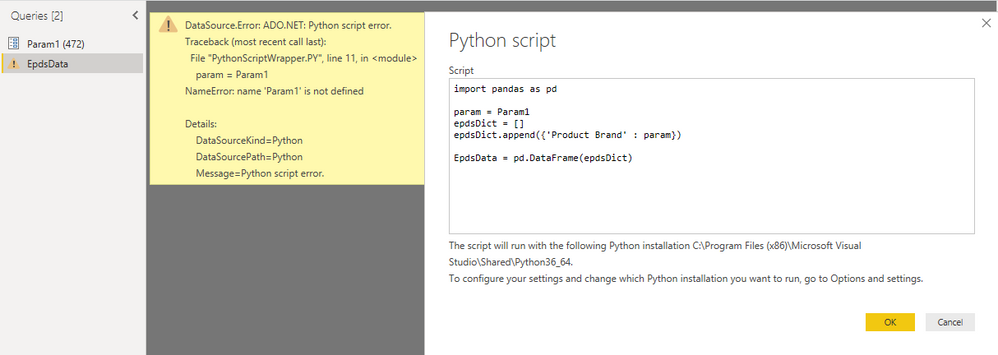
I wan't to use Python Script to query a web api, by a Parameter. How do I reference a Parameter from with a Python Script?

Problem is simplified underneath.


CaputeParameter.PNG

1 ACCEPTED SOLUTION

Hi @HenrikHulstrøm ,

Sorry for that, I'm not familar with Python script.

Please refer to this script. As the variable should be text value, we need translate the parameter as text type.

let
    Source = Table.FromRows(Json.Document(Binary.Decompress(Binary.FromText("i45WMlSK1YlWMgKTxkqxsQA=", BinaryEncoding.Base64), Compression.Deflate)), let _t = ((type text) meta [Serialized.Text = true]) in type table [Column1 = _t]),
    #"Changed Type" = Table.TransformColumnTypes(Source,{{"Column1", type text}}),
    #"Run Python script" = Python.Execute("# 'dataset' holds the input data for this script#(lf)import pandas as pd#(lf)#(lf)param="&Text.From(Param1)&"#(lf)epdsDict=[]#(lf)epdsDict.append({'Product Brand': param})#(lf)Table= pd.DataFrame(epdsDict)",[dataset=#"Changed Type"])
in
    #"Run Python script"

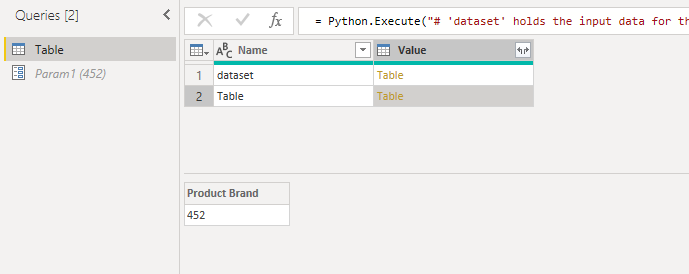
Here is the output.

output.PNG

Best Regards,

Cherry

Community Support Team _ Cherry Gao
If this post helps, then please consider Accept it as the solution to help the other members find it more quickly.

View solution in original post

4 REPLIES 4
v-piga-msft
Resident Rockstar
Resident Rockstar

Hi @HenrikHulstrøm ,

By my tests and research, I'm afraid that your syntax of referencing parameter is incorrect.

Please try the code below.

import pandas as pd
param= '"&Param1&"'
EpdsDict=[]
......
......

Best  Regards,

Cherry


Community Support Team _ Cherry Gao
If this post helps, then please consider Accept it as the solution to help the other members find it more quickly.

Hi Cherry - thanks for helping.


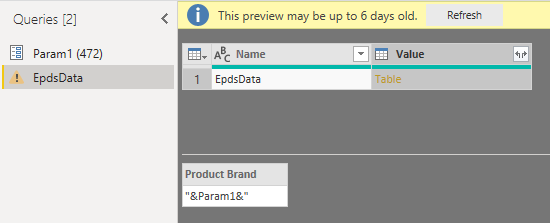
Your suggest will not read out the value '472', but assign &Param1& to variable param.
CaptureParameter1.PNG


Hi @HenrikHulstrøm ,

Sorry for that, I'm not familar with Python script.

Please refer to this script. As the variable should be text value, we need translate the parameter as text type.

let
    Source = Table.FromRows(Json.Document(Binary.Decompress(Binary.FromText("i45WMlSK1YlWMgKTxkqxsQA=", BinaryEncoding.Base64), Compression.Deflate)), let _t = ((type text) meta [Serialized.Text = true]) in type table [Column1 = _t]),
    #"Changed Type" = Table.TransformColumnTypes(Source,{{"Column1", type text}}),
    #"Run Python script" = Python.Execute("# 'dataset' holds the input data for this script#(lf)import pandas as pd#(lf)#(lf)param="&Text.From(Param1)&"#(lf)epdsDict=[]#(lf)epdsDict.append({'Product Brand': param})#(lf)Table= pd.DataFrame(epdsDict)",[dataset=#"Changed Type"])
in
    #"Run Python script"

Here is the output.

output.PNG

Best Regards,

Cherry

Community Support Team _ Cherry Gao
If this post helps, then please consider Accept it as the solution to help the other members find it more quickly.

I found the solution. Please like my post: 


param='"&Text.From(Param1)&"'

note the single quotes.  

Helpful resources

Announcements
Fabric Data Days is here Carousel

Fabric Data Days 2026

Don't miss out on Data Days, June 15 through August 7. Learn Fabric, Power BI, SQL, AI and more.

May Power BI Update Carousel

Power BI Monthly Update - May 2026

Check out the May 2026 Power BI update to learn about new features.

Power BI DataViz World Championships carousel

Power BI DataViz World Championships - June 2026

A new Power BI DataViz World Championship is coming this June! Don't miss out on submitting your entry.