Don't miss your chance to take the Fabric Data Engineer (DP-600) exam for FREE! Find out how by watching the DP-600 session on-demand now through April 28th.
Learn moreJoin the FabCon + SQLCon recap series. Up next: Power BI, Real-Time Intelligence, IQ and AI, and Data Factory take center stage. All sessions are available on-demand after the live show. Register now
Hi everyone,
Kind of new to the power query/pbi here, hope its an easy questions
Please see below screenshot
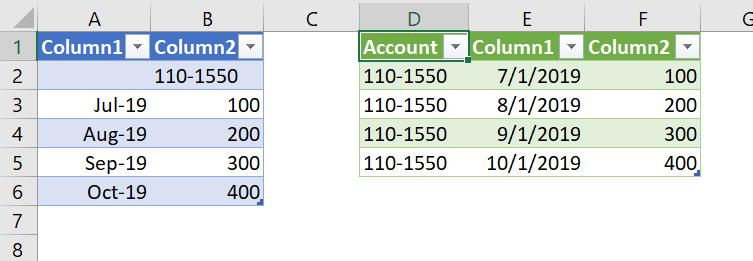
How to convert from the data set on the left to the data set on the right? In either power query/query editor
The data on the right repeat in that arrangement
I assume its a custom column function?
Thanks Heaps
Wendy
Solved! Go to Solution.
Download my attached workbook to see what I did.
Essentially I:
End result - Blue table is before, green table after:
DAX is for Analysis. Power Query is for Data Modeling
Proud to be a Super User!
MCSA: BI ReportingDownload my attached workbook to see what I did.
Essentially I:
End result - Blue table is before, green table after:
DAX is for Analysis. Power Query is for Data Modeling
Proud to be a Super User!
MCSA: BI ReportingGreat! Fill Up/Down is a really useful transformation when you have a report you are trying to convert to a useful table.
DAX is for Analysis. Power Query is for Data Modeling
Proud to be a Super User!
MCSA: BI ReportingCheck out the April 2026 Power BI update to learn about new features.
If you have recently started exploring Fabric, we'd love to hear how it's going. Your feedback can help with product improvements.
A new Power BI DataViz World Championship is coming this June! Don't miss out on submitting your entry.
| User | Count |
|---|---|
| 3 | |
| 3 | |
| 2 | |
| 2 | |
| 2 |
| User | Count |
|---|---|
| 5 | |
| 4 | |
| 4 | |
| 4 | |
| 4 |