cancel
Showing results for 
Search instead for 
Did you mean: 

July 7 - July 17 | Round 2 of the Power BI Dataviz World Championships. Don't miss your chance! Learn more

Reply
WLou
Helper I
Helper I

Rearrange Data

Hi everyone, 


Kind of new to the power query/pbi here, hope its an easy questions 

Please see below screenshot 

How to convert from the data set on the left to the data set on the right? In either power query/query editor

The data on the right repeat in that arrangement 

I assume its a custom column function?

Raw.jpg


Thanks Heaps 

Wendy

1 ACCEPTED SOLUTION
edhans
Community Champion
Community Champion

Download my attached workbook to see what I did.


Essentially I:

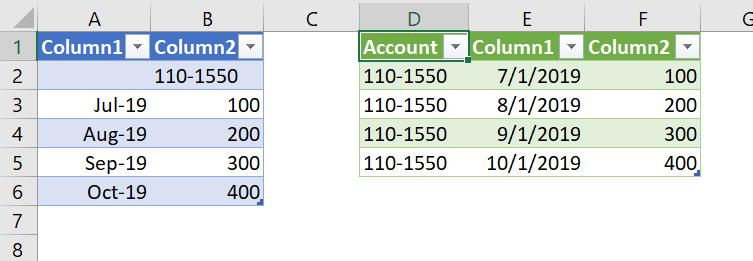
  1. Added a custom column. If the date column was null, get the value from the other column. Your data seems to consistently have a blank date where there is an account number.
  2. In the new column, selected Fill Down.
  3. Filtered out the blank rows in Date.

End result - Blue table is before, green table after:

2020-01-15 20_55_31-20200115 - Fill Down Example - Excel.png


Did I answer your question? Mark my post as a solution!
Did my answers help arrive at a solution? Give it a kudos by clicking the Thumbs Up!

DAX is for Analysis. Power Query is for Data Modeling


Proud to be a Super User!

MCSA: BI Reporting

View solution in original post

3 REPLIES 3
edhans
Community Champion
Community Champion

Download my attached workbook to see what I did.


Essentially I:

  1. Added a custom column. If the date column was null, get the value from the other column. Your data seems to consistently have a blank date where there is an account number.
  2. In the new column, selected Fill Down.
  3. Filtered out the blank rows in Date.

End result - Blue table is before, green table after:

2020-01-15 20_55_31-20200115 - Fill Down Example - Excel.png


Did I answer your question? Mark my post as a solution!
Did my answers help arrive at a solution? Give it a kudos by clicking the Thumbs Up!

DAX is for Analysis. Power Query is for Data Modeling


Proud to be a Super User!

MCSA: BI Reporting

Thank you @edhans 


New trick "Fill down/up" learned !

edhans
Community Champion
Community Champion

Great! Fill Up/Down is a really useful transformation when you have a report you are trying to convert to a useful table.


Did I answer your question? Mark my post as a solution!
Did my answers help arrive at a solution? Give it a kudos by clicking the Thumbs Up!

DAX is for Analysis. Power Query is for Data Modeling


Proud to be a Super User!

MCSA: BI Reporting

Helpful resources

Announcements
FabCon and SQLCon Barcelona 2026

FabCon & SQLCon – Barcelona 2026

Join us in Barcelona for FabCon and SQLCon, the Fabric, Power BI, SQL, and AI community event. Save €200 with code FABCMTY200.

60 days of Data Days Carousel

Data Days 2026

Join Fabric Data Days 2026: 60 days of free live/on-demand sessions, challenges, study groups, and certification opportunities.

Power BI DataViz World Championships carousel

Power BI DataViz World Championships - June 2026

A new Power BI DataViz World Championship is coming this June! Don't miss out on submitting your entry.