We've captured the moments from FabCon & SQLCon that everyone is talking about, and we are bringing them to the community, live and on-demand. Starts on April 14th. Register now
Hi everyone,
Kind of new to the power query/pbi here, hope its an easy questions
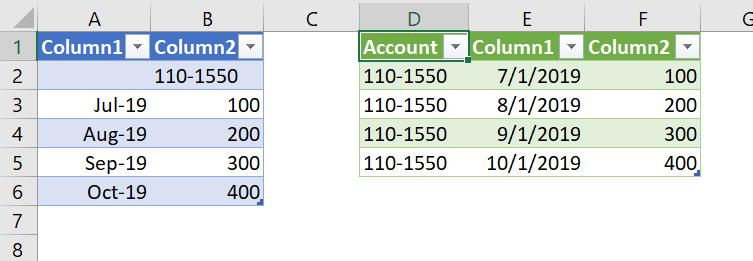
Please see below screenshot
How to convert from the data set on the left to the data set on the right? In either power query/query editor
The data on the right repeat in that arrangement
I assume its a custom column function?
Thanks Heaps
Wendy
Solved! Go to Solution.
Download my attached workbook to see what I did.
Essentially I:
End result - Blue table is before, green table after:
DAX is for Analysis. Power Query is for Data Modeling
Proud to be a Super User!
MCSA: BI ReportingDownload my attached workbook to see what I did.
Essentially I:
End result - Blue table is before, green table after:
DAX is for Analysis. Power Query is for Data Modeling
Proud to be a Super User!
MCSA: BI ReportingGreat! Fill Up/Down is a really useful transformation when you have a report you are trying to convert to a useful table.
DAX is for Analysis. Power Query is for Data Modeling
Proud to be a Super User!
MCSA: BI ReportingIf you have recently started exploring Fabric, we'd love to hear how it's going. Your feedback can help with product improvements.
A new Power BI DataViz World Championship is coming this June! Don't miss out on submitting your entry.
Share feedback directly with Fabric product managers, participate in targeted research studies and influence the Fabric roadmap.
| User | Count |
|---|---|
| 6 | |
| 4 | |
| 3 | |
| 2 | |
| 2 |
| User | Count |
|---|---|
| 11 | |
| 10 | |
| 7 | |
| 7 | |
| 6 |