This is best Fabric, Power BI, SQL and AI community event. How do we know? The last event sold out! Save €200 with code FABCMTY200.
Register nowA new Data Days event is coming soon! This time we’re going bigger than ever. Fabric, Power BI, SQL, AI and more. Don't miss out.
Hi,
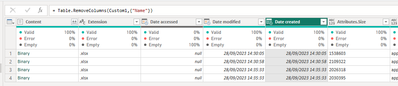
I'm picking up some excel files from Sharepoint and I'd like to be able to see when they were created. However, PowerQuery is only presenting when the file was created on Sharepoint, not its original creation date.
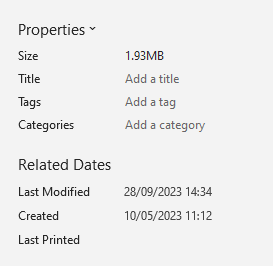
If I download one of the files, open it in Excel and go to File > Info, I can see the real created date:
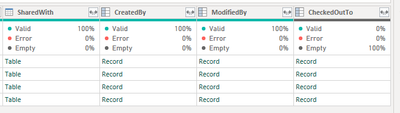
I've loaded the full attributes from Sharepoint, they gave me values for Size, Content Type and Kind. Is there any way to read the metadata from within the excel file? The only options I see when I merge the files is the names of each of the worksheets contained in them, no metadata. I don't have write-permission to the Sharepoint repository.
I thought that would do it, but sadly not:
Still get Metadata groupings that are not required.
Hi @pmay ,
Try following this thread to see if it works for you:
It basically uses the ODATA connector to the SharePoint bin/listdata respository to get all files metadata.
Pete
Proud to be a Datanaut!
Check out the May 2026 Power BI update to learn about new features.
Sign up to receive a private message when registration opens and key events begin.
If you have recently started exploring Fabric, we'd love to hear how it's going. Your feedback can help with product improvements.