This time we’re going bigger than ever. Fabric, Power BI, SQL, AI and more. We're covering it all. You won't want to miss it.
Learn moreLevel up your Power BI skills this month - build one visual each week and tell better stories with data! Get started
I have searched high and low for an answer but cannot find anything that works. Hoping someone can help.
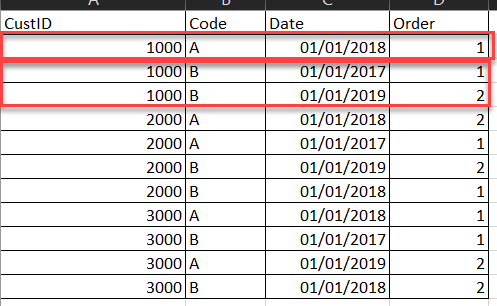
I want to add a 'Calculated Column' to a table that has millions of rows. The main columns in my table that are affected by the requirement are:
CustID Code Date
I want to add a Rank (Order) column that the logic groups by CustID & Code and then adds the Rank/Order based on the 3rd Column Date. I don't want to actually group the rows I just want to add the Rank/Order column based on that logic if that makes sense?
Solved! Go to Solution.
Hello @tanyad
but this is how Power Query works. You have to apply a Table.Group and then Sort and add a Index-column.
Here the complete solution
let
Source = #table
(
{"CustID","Code","Date"},
{
{"1000","A","43101"}, {"1000","B","42736"}, {"1000","B","43466"}, {"2000","A","43101"}, {"2000","A","42736"}, {"2000","B","43466"}, {"2000","B","43101"}
}
),
ToDate = Table.TransformColumns
(
Source,
{
{
"Date",
each Date.From(Number.From(_)),
type date
}
}
),
Group = Table.Group(ToDate, {"CustID", "Code"}, {{"AllRows", each _, type table [CustID=text, Code=text, Date=date]}}),
SortAndIndex = Table.TransformColumns
(
Group,
{
{
"AllRows",
(Tableint)=> let
Sort = Table.Sort(Tableint, {{"Date", Order.Ascending}}),
AddIndex = Table.AddIndexColumn(Sort, "Order",1,1)
in
AddIndex
}
}
),
DeleteOther = Table.SelectColumns(SortAndIndex,{"AllRows"}),
Expand = Table.ExpandTableColumn(DeleteOther, "AllRows", {"CustID", "Code", "Date", "Order"}, {"CustID", "Code", "Date", "Order"})
in
ExpandCopy paste this code to the advanced editor in a new blank query to see how the solution works. If this solution fits your need, copy and past a part of it and implement it in your query.
If this post helps or solves your problem, please mark it as solution (to help other users find useful content and to acknowledge the work of users that helped you)
Kudoes are nice too
Have fun
Jimmy
Hello @tanyad
but this is how Power Query works. You have to apply a Table.Group and then Sort and add a Index-column.
Here the complete solution
let
Source = #table
(
{"CustID","Code","Date"},
{
{"1000","A","43101"}, {"1000","B","42736"}, {"1000","B","43466"}, {"2000","A","43101"}, {"2000","A","42736"}, {"2000","B","43466"}, {"2000","B","43101"}
}
),
ToDate = Table.TransformColumns
(
Source,
{
{
"Date",
each Date.From(Number.From(_)),
type date
}
}
),
Group = Table.Group(ToDate, {"CustID", "Code"}, {{"AllRows", each _, type table [CustID=text, Code=text, Date=date]}}),
SortAndIndex = Table.TransformColumns
(
Group,
{
{
"AllRows",
(Tableint)=> let
Sort = Table.Sort(Tableint, {{"Date", Order.Ascending}}),
AddIndex = Table.AddIndexColumn(Sort, "Order",1,1)
in
AddIndex
}
}
),
DeleteOther = Table.SelectColumns(SortAndIndex,{"AllRows"}),
Expand = Table.ExpandTableColumn(DeleteOther, "AllRows", {"CustID", "Code", "Date", "Order"}, {"CustID", "Code", "Date", "Order"})
in
ExpandCopy paste this code to the advanced editor in a new blank query to see how the solution works. If this solution fits your need, copy and past a part of it and implement it in your query.
If this post helps or solves your problem, please mark it as solution (to help other users find useful content and to acknowledge the work of users that helped you)
Kudoes are nice too
Have fun
Jimmy
Check out the April 2026 Power BI update to learn about new features.
Sign up to receive a private message when registration opens and key events begin.
If you have recently started exploring Fabric, we'd love to hear how it's going. Your feedback can help with product improvements.