cancel
Showing results for 
Search instead for 
Did you mean: 

The Power BI Data Visualization World Championships is back! Get ahead of the game and start preparing now! Learn more

Reply
madayova
Frequent Visitor

R script refresh RScript.exe was not found in the specified R home directory

Hi All!


I am trying to schedule refresh for a R-script dataset. And I get this error:

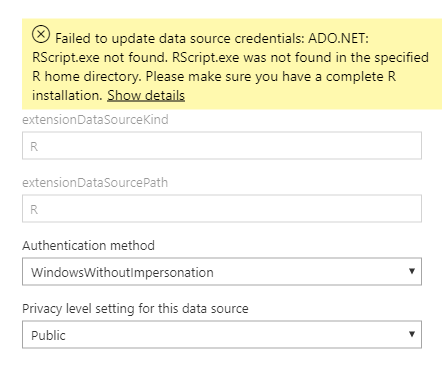
Failed to update data source credentials: ADO.NET: RScript.exe not found. RScript.exe was not found in the specified R home directory. Please make sure you have a complete R installation.

Capture.PNG
I have installed Personal Getaway and R (put a R directory path in settings). On Desktop it works fine.
Capture1.PNG 


Thanks!

3 REPLIES 3
olga_ivanova
Regular Visitor

I had this problem with a Python script. The latest supported version of Python in Power BI is 3.7.1 according to this annoucement, but I had Python 3.7.2 on my computer, so I decided to reinstall 3.7.1 just in case. I don't know why this worked, but it fixed the issue for me.


Smallegrue
Frequent Visitor

Did you find the solution? I am having the same issue.

No, I have not found.

Helpful resources

Announcements
Power BI DataViz World Championships

Power BI Dataviz World Championships

The Power BI Data Visualization World Championships is back! Get ahead of the game and start preparing now!

December 2025 Power BI Update Carousel

Power BI Monthly Update - December 2025

Check out the December 2025 Power BI Holiday Recap!

FabCon Atlanta 2026 carousel

FabCon Atlanta 2026

Join us at FabCon Atlanta, March 16-20, for the ultimate Fabric, Power BI, AI and SQL community-led event. Save $200 with code FABCOMM.