cancel
Showing results for 
Search instead for 
Did you mean: 

Learn from the best! Meet the four finalists headed to the FINALS of the Power BI Dataviz World Championships! Register now

Reply
madayova
Frequent Visitor

R script refresh RScript.exe was not found in the specified R home directory

Hi All!


I am trying to schedule refresh for a R-script dataset. And I get this error:

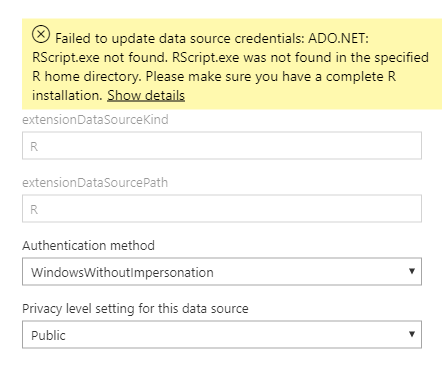
Failed to update data source credentials: ADO.NET: RScript.exe not found. RScript.exe was not found in the specified R home directory. Please make sure you have a complete R installation.

Capture.PNG
I have installed Personal Getaway and R (put a R directory path in settings). On Desktop it works fine.
Capture1.PNG 


Thanks!

3 REPLIES 3
olga_ivanova
Regular Visitor

I had this problem with a Python script. The latest supported version of Python in Power BI is 3.7.1 according to this annoucement, but I had Python 3.7.2 on my computer, so I decided to reinstall 3.7.1 just in case. I don't know why this worked, but it fixed the issue for me.


Smallegrue
Frequent Visitor

Did you find the solution? I am having the same issue.

No, I have not found.

Helpful resources

Announcements
Join our Fabric User Panel

Join our Fabric User Panel

Share feedback directly with Fabric product managers, participate in targeted research studies and influence the Fabric roadmap.

February Power BI Update Carousel

Power BI Monthly Update - February 2026

Check out the February 2026 Power BI update to learn about new features.