
Join us at FabCon Atlanta from March 16 - 20, 2026, for the ultimate Fabric, Power BI, AI and SQL community-led event. Save $200 with code FABCOMM.
Register now!The Power BI Data Visualization World Championships is back! It's time to submit your entry. Live now!
Hi folks,
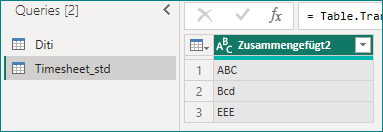
I want to compare strings from columns from two tables.
If the same string exists in both tables I want to output 1 if not 0.
I created a new column in Table Diti with the function:
if [Zusammengefügt] = Timesheet_std[Zusammengefügt2] then 1 else 0
The syntax is fine, but I get 0 for all entries even for the ones which exist in both columns.
Which lead me to the concluison, that maybe the linking of my tables (Diti and Timesheet_std), which are connected through the columns Zusammengefügt and Zusammengefügt2 is not working properly. But when I go into the visuals, everything works fine both tables update if I filter them by something, so the connection should work.
Which leads to my concluison, that the power query function I wrote has a mistake in it, which I wasn't able to find.
If anyone can suggest a solution or a diffrent approach to solve this problem - I would be very happy.
Thanks in advance
Philipp
Hi @ACC_Entwickler1 ,
If case-sensitive, try:
= if List.Contains(#"Timesheet_std"[Zusammengefügt2],[Zusammengefügt]) then 1 else 0
Otherwise:
if List.Contains(List.Transform(#"Timesheet_std"[Zusammengefügt2], each Text.Upper(_)), Text.Upper([Zusammengefügt])) then 1 else 0
Best Regards,
Gao
Community Support Team
If there is any post helps, then please consider Accept it as the solution to help the other members find it more quickly. If I misunderstand your needs or you still have problems on it, please feel free to let us know. Thanks a lot!
How to get your questions answered quickly -- How to provide sample data in the Power BI Forum
hi @ACC_Entwickler1 ,
if you are comparing strings, ensure they are the same format ( clean, trim and upper might help, else use Comparer.OrdinalIgnoreCase - PowerQuery M | Microsoft Learn for case insensitive comparisons).
if this doesn't work,
please provide the pbix / same input and output data removing sensitive information if possible.
thanks
The Power BI Data Visualization World Championships is back! It's time to submit your entry.
Check out the January 2026 Power BI update to learn about new features.
| User | Count |
|---|---|
| 19 | |
| 12 | |
| 9 | |
| 8 | |
| 8 |