Don't miss your chance to take the Fabric Data Engineer (DP-600) exam for FREE! Find out how by attending the DP-600 session on April 23rd (pacific time), live or on-demand.
Learn moreNext up in the FabCon + SQLCon recap series: The roadmap for Microsoft SQL and Maximizing Developer experiences in Fabric. All sessions are available on-demand after the live show. Register now
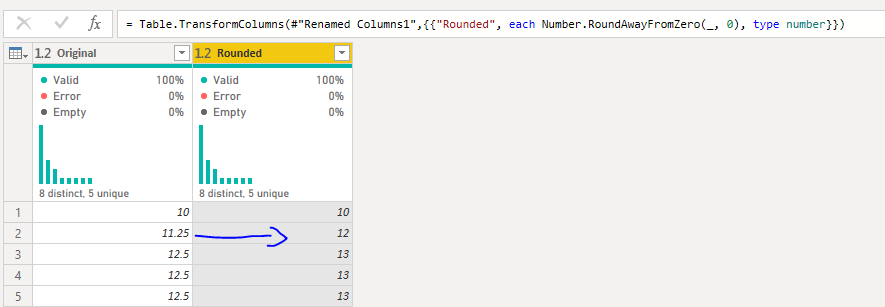
I have a decimal column in PowerQuery with numbers as below:
11.25
12.5
Whenever I roundup, 11.25 is changed to 12 and 12.5 is 13
Whenever I rounddown, 11.25 is changed to 11 but now 12.5 is 12.
The desired outcome should be
11.25 -> 11
12.5 -> 13
I am using this type of calculation with excel =ROUND(Column,0) and I have no issues with it.
Please suggest, thanks 🙂
Solved! Go to Solution.
The default rounding mode for power query is to handle the mid-point by rounding to the closest even number.
Since you seem to want to round away from zero, you need to replace Number.Round(number, [digits]) in your M-code with Number.Round(number, [digits], RoundingModeAwayFromZero).
Excel ROUND inherently does RoundAwayFromZero, and VBA.Round does RoundToEven
let
Source = Table.FromRows(Json.Document(Binary.Decompress(Binary.FromText("i45WMjRQitUBUoZ6RqYQlpEelGEMYsQCAA==", BinaryEncoding.Base64), Compression.Deflate)), let _t = ((type nullable text) meta [Serialized.Text = true]) in type table [Main = _t]),
#"Changed Type" = Table.TransformColumnTypes(Source,{{"Main", type number}}),
#"Added Custom" = Table.AddColumn(#"Changed Type", "PQ Round",
each Number.Round([Main ]), type number),
#"Added Custom0" = Table.AddColumn(#"Added Custom", "RoundUp",
each Number.RoundUp([Main]), type number),
#"Added Custom1" = Table.AddColumn(#"Added Custom0", "RoundDown",
each Number.RoundDown([Main]), type number),
#"Added Custom2" = Table.AddColumn(#"Added Custom1", "RoundAwayFromZero 1",
each Number.Round([Main],0,RoundingMode.AwayFromZero), type number)
in
#"Added Custom2"
Thanks @ronrsnfld for your respond.
I have edited the M-Code but it doesnt seem to be working. The only issue is whenever the code tries to roundup 11.25 it gives result as 12 whereas it should be 11.
See my edited answer. You need to use
Number.Round([Main],0,RoundingMode.AwayFromZero
I initially thought that and Number.RoundAwayFromZero were the same, but they are not.
The default rounding mode for power query is to handle the mid-point by rounding to the closest even number.
Since you seem to want to round away from zero, you need to replace Number.Round(number, [digits]) in your M-code with Number.Round(number, [digits], RoundingModeAwayFromZero).
Excel ROUND inherently does RoundAwayFromZero, and VBA.Round does RoundToEven
let
Source = Table.FromRows(Json.Document(Binary.Decompress(Binary.FromText("i45WMjRQitUBUoZ6RqYQlpEelGEMYsQCAA==", BinaryEncoding.Base64), Compression.Deflate)), let _t = ((type nullable text) meta [Serialized.Text = true]) in type table [Main = _t]),
#"Changed Type" = Table.TransformColumnTypes(Source,{{"Main", type number}}),
#"Added Custom" = Table.AddColumn(#"Changed Type", "PQ Round",
each Number.Round([Main ]), type number),
#"Added Custom0" = Table.AddColumn(#"Added Custom", "RoundUp",
each Number.RoundUp([Main]), type number),
#"Added Custom1" = Table.AddColumn(#"Added Custom0", "RoundDown",
each Number.RoundDown([Main]), type number),
#"Added Custom2" = Table.AddColumn(#"Added Custom1", "RoundAwayFromZero 1",
each Number.Round([Main],0,RoundingMode.AwayFromZero), type number)
in
#"Added Custom2"
If you have recently started exploring Fabric, we'd love to hear how it's going. Your feedback can help with product improvements.
A new Power BI DataViz World Championship is coming this June! Don't miss out on submitting your entry.
Share feedback directly with Fabric product managers, participate in targeted research studies and influence the Fabric roadmap.
| User | Count |
|---|---|
| 6 | |
| 3 | |
| 3 | |
| 3 | |
| 2 |