cancel
Showing results for 
Search instead for 
Did you mean: 

Data Days is here! Join us now for 60+ days of learning, challenges, and connection. Learn more

Reply
Anonymous
Not applicable

PowerQuery Rounding Issues

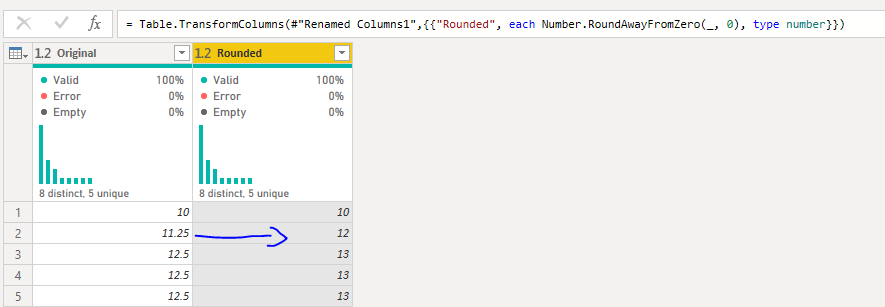
I have a decimal column in PowerQuery with numbers as below:

11.25
12.5

Whenever I roundup, 11.25 is changed to 12 and 12.5 is 13
Whenever I rounddown, 11.25 is changed to 11 but now 12.5 is 12.


The desired outcome should be 
11.25 -> 11
12.5 -> 13

I am using this type of calculation with excel =ROUND(Column,0) and I have no issues with it.

Please suggest, thanks 🙂 

Issue.PNG

1 ACCEPTED SOLUTION
ronrsnfld
Super User
Super User

The default rounding mode for power query is to handle the mid-point by rounding to the closest even number.


Since you seem to want to round away from zero, you need to replace Number.Round(number, [digits]) in your M-code with Number.Round(number, [digits], RoundingModeAwayFromZero).


Excel ROUND inherently does RoundAwayFromZero, and VBA.Round does RoundToEven


let
    Source = Table.FromRows(Json.Document(Binary.Decompress(Binary.FromText("i45WMjRQitUBUoZ6RqYQlpEelGEMYsQCAA==", BinaryEncoding.Base64), Compression.Deflate)), let _t = ((type nullable text) meta [Serialized.Text = true]) in type table [Main = _t]),
    #"Changed Type" = Table.TransformColumnTypes(Source,{{"Main", type number}}),
    
    #"Added Custom" = Table.AddColumn(#"Changed Type", "PQ Round", 
        each Number.Round([Main ]), type number),
    
    #"Added Custom0" = Table.AddColumn(#"Added Custom", "RoundUp", 
        each Number.RoundUp([Main]), type number),
    
    #"Added Custom1" = Table.AddColumn(#"Added Custom0", "RoundDown", 
        each Number.RoundDown([Main]), type number),
    
    #"Added Custom2" = Table.AddColumn(#"Added Custom1", "RoundAwayFromZero 1", 
        each Number.Round([Main],0,RoundingMode.AwayFromZero), type number)

in
    #"Added Custom2"

ronrsnfld_0-1667327121679.png


View solution in original post

4 REPLIES 4
Anonymous
Not applicable

Thank you @ronrsnfld  - It worked 🙂 

Anonymous
Not applicable

Thanks @ronrsnfld  for your respond.

I have edited the M-Code but it doesnt seem to be working. The only issue is whenever the code tries to roundup 11.25 it gives result as 12 whereas it should be 11.Issue.PNG

See my edited answer. You need to use 

Number.Round([Main],0,RoundingMode.AwayFromZero


I initially thought that and Number.RoundAwayFromZero were the same, but they are not.

ronrsnfld
Super User
Super User

The default rounding mode for power query is to handle the mid-point by rounding to the closest even number.


Since you seem to want to round away from zero, you need to replace Number.Round(number, [digits]) in your M-code with Number.Round(number, [digits], RoundingModeAwayFromZero).


Excel ROUND inherently does RoundAwayFromZero, and VBA.Round does RoundToEven


let
    Source = Table.FromRows(Json.Document(Binary.Decompress(Binary.FromText("i45WMjRQitUBUoZ6RqYQlpEelGEMYsQCAA==", BinaryEncoding.Base64), Compression.Deflate)), let _t = ((type nullable text) meta [Serialized.Text = true]) in type table [Main = _t]),
    #"Changed Type" = Table.TransformColumnTypes(Source,{{"Main", type number}}),
    
    #"Added Custom" = Table.AddColumn(#"Changed Type", "PQ Round", 
        each Number.Round([Main ]), type number),
    
    #"Added Custom0" = Table.AddColumn(#"Added Custom", "RoundUp", 
        each Number.RoundUp([Main]), type number),
    
    #"Added Custom1" = Table.AddColumn(#"Added Custom0", "RoundDown", 
        each Number.RoundDown([Main]), type number),
    
    #"Added Custom2" = Table.AddColumn(#"Added Custom1", "RoundAwayFromZero 1", 
        each Number.Round([Main],0,RoundingMode.AwayFromZero), type number)

in
    #"Added Custom2"

ronrsnfld_0-1667327121679.png


Helpful resources

Announcements
Fabric Data Days is here Carousel

Fabric Data Days 2026

Don't miss out on Data Days, June 15 through August 7. Learn Fabric, Power BI, SQL, AI and more.

May Power BI Update Carousel

Power BI Monthly Update - May 2026

Check out the May 2026 Power BI update to learn about new features.

Power BI DataViz World Championships carousel

Power BI DataViz World Championships - June 2026

A new Power BI DataViz World Championship is coming this June! Don't miss out on submitting your entry.