cancel
Showing results for 
Search instead for 
Did you mean: 

July 7 - July 17 | Round 2 of the Power BI Dataviz World Championships. Don't miss your chance! Learn more

Reply
graphIt
Frequent Visitor

Power query update column from another table.

Hi folks,


I have been struggling with this in Power Query.


I have 2 tables

Table1

UNIT

StartDate

EndDate

1111Dec 1, 2020null
2222Dec 1, 2020null
3333Dec 1, 2020null


Table2

UNITStartDateEndDate
1111Jan 1, 2020null
2222Jan 1, 2020null
4444Jan 1, 2020null


I want to update Table2[Endate] to be Table1[StartDate] where Table2[UNIT] = Table1[UNIT]


End Result would look like
Table2

UNITStartDateEndDate
1111Jan 1, 2020Dec 1, 2020
2222Jan 1, 2020Dec 1, 2020
4444Jan 1, 2020null


I'm sure I'm on the right path, just not getting the syntax right.

I've tried 


table3 = Table.ReplaceValue(Table2, null, Table.SelectRows(Table1, each [UNIT] = Table2[UNIT]), Replacer.ReplaceValue, {"EndDate"})


I know the issue is with Table.SelectRows(Table1, each [UNIT] = Table2[UNIT]) as I don't think it does the comparison right and returns a blank table.


I also tried changing that part to be:

Table.SelectRows(Table1, each [UNIT] = List.First(List.Intersect(Table2[UNIT])))


which is also wrong for many reasons. I feel like I'm close here, or maybe I'm way out. Hoping you fine folks can help.


Thank you

1 ACCEPTED SOLUTION
edhans
Community Champion
Community Champion

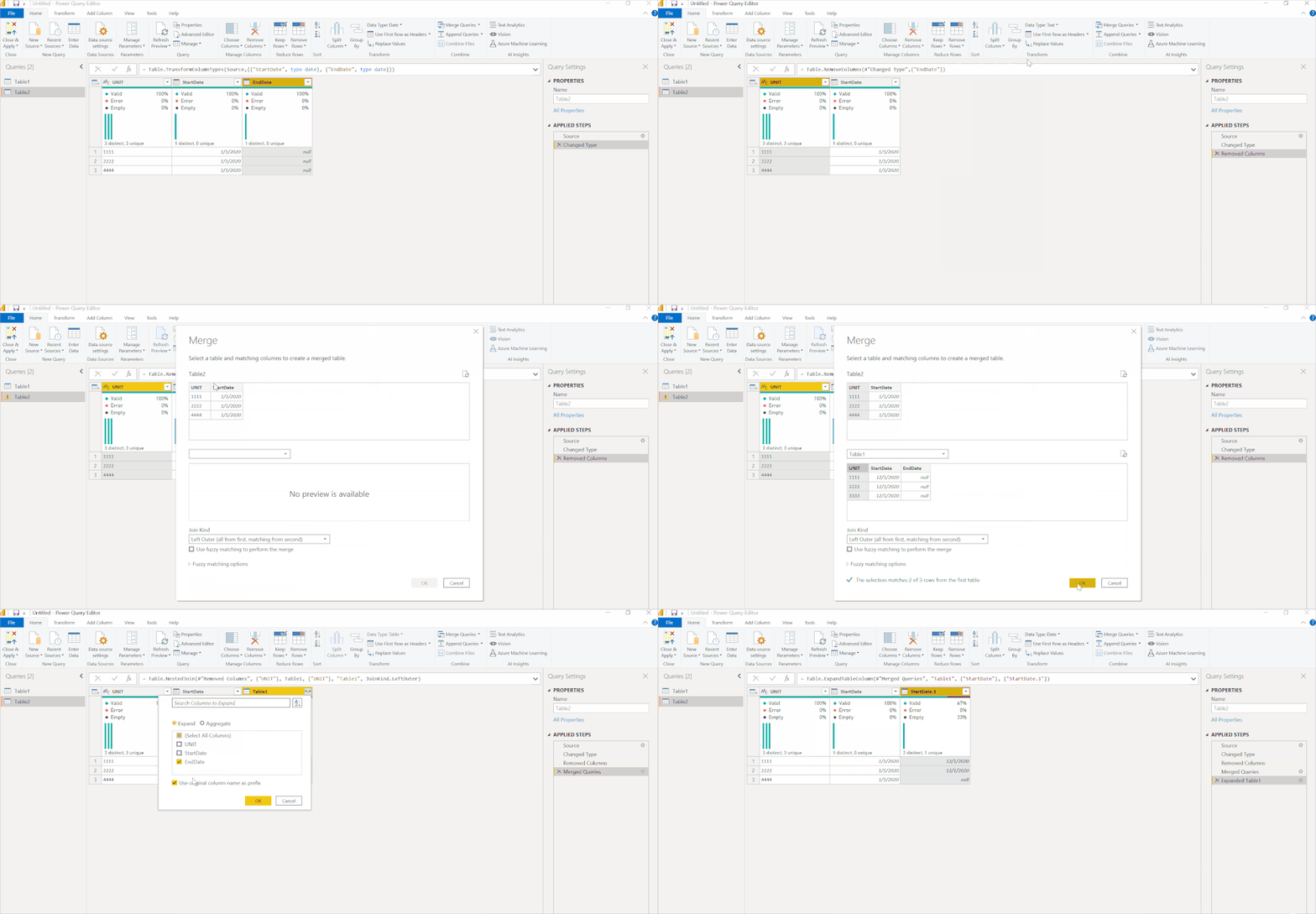
You do this with a merge. What you are doing is thinking like Excel with a vlookup. That can work ok with a few records, or a few thousand records maybe but above that, it will get super slow.

  1. Go to Table2
  2. Remove the EndDate column.
  3. Select Merge
  4. Merge with Table1 on the UNIT column
  5. Expand the StartDate
  6. Rename StartDate1 to "End Date" - I forgot to do that in this walkthrough.

This will perform very well with larger datasets.


MergeEndDate.gif


Did I answer your question? Mark my post as a solution!
Did my answers help arrive at a solution? Give it a kudos by clicking the Thumbs Up!

DAX is for Analysis. Power Query is for Data Modeling


Proud to be a Super User!

MCSA: BI Reporting

View solution in original post

3 REPLIES 3
edhans
Community Champion
Community Champion

You do this with a merge. What you are doing is thinking like Excel with a vlookup. That can work ok with a few records, or a few thousand records maybe but above that, it will get super slow.

  1. Go to Table2
  2. Remove the EndDate column.
  3. Select Merge
  4. Merge with Table1 on the UNIT column
  5. Expand the StartDate
  6. Rename StartDate1 to "End Date" - I forgot to do that in this walkthrough.

This will perform very well with larger datasets.


MergeEndDate.gif


Did I answer your question? Mark my post as a solution!
Did my answers help arrive at a solution? Give it a kudos by clicking the Thumbs Up!

DAX is for Analysis. Power Query is for Data Modeling


Proud to be a Super User!

MCSA: BI Reporting

that did the trick thank you very much.

edhans
Community Champion
Community Champion

Glad I was able to help @graphIt 


Did I answer your question? Mark my post as a solution!
Did my answers help arrive at a solution? Give it a kudos by clicking the Thumbs Up!

DAX is for Analysis. Power Query is for Data Modeling


Proud to be a Super User!

MCSA: BI Reporting

Helpful resources

Announcements
FabCon and SQLCon Barcelona 2026

FabCon & SQLCon – Barcelona 2026

Join us in Barcelona for FabCon and SQLCon, the Fabric, Power BI, SQL, and AI community event. Save €200 with code FABCMTY200.

60 days of Data Days Carousel

Data Days 2026

Join Fabric Data Days 2026: 60 days of free live/on-demand sessions, challenges, study groups, and certification opportunities.

Power BI DataViz World Championships carousel

Power BI DataViz World Championships - June 2026

A new Power BI DataViz World Championship is coming this June! Don't miss out on submitting your entry.