This time we’re going bigger than ever. Fabric, Power BI, SQL, AI and more. We're covering it all. You won't want to miss it.
Learn moreLevel up your Power BI skills this month - build one visual each week and tell better stories with data! Get started
Hi folks,
I have been struggling with this in Power Query.
I have 2 tables
Table1
| UNIT | StartDate | EndDate |
| 1111 | Dec 1, 2020 | null |
| 2222 | Dec 1, 2020 | null |
| 3333 | Dec 1, 2020 | null |
Table2
| UNIT | StartDate | EndDate |
| 1111 | Jan 1, 2020 | null |
| 2222 | Jan 1, 2020 | null |
| 4444 | Jan 1, 2020 | null |
I want to update Table2[Endate] to be Table1[StartDate] where Table2[UNIT] = Table1[UNIT]
End Result would look like
Table2
| UNIT | StartDate | EndDate |
| 1111 | Jan 1, 2020 | Dec 1, 2020 |
| 2222 | Jan 1, 2020 | Dec 1, 2020 |
| 4444 | Jan 1, 2020 | null |
I'm sure I'm on the right path, just not getting the syntax right.
I've tried
table3 = Table.ReplaceValue(Table2, null, Table.SelectRows(Table1, each [UNIT] = Table2[UNIT]), Replacer.ReplaceValue, {"EndDate"})
I know the issue is with Table.SelectRows(Table1, each [UNIT] = Table2[UNIT]) as I don't think it does the comparison right and returns a blank table.
I also tried changing that part to be:
Table.SelectRows(Table1, each [UNIT] = List.First(List.Intersect(Table2[UNIT])))
which is also wrong for many reasons. I feel like I'm close here, or maybe I'm way out. Hoping you fine folks can help.
Thank you
Solved! Go to Solution.
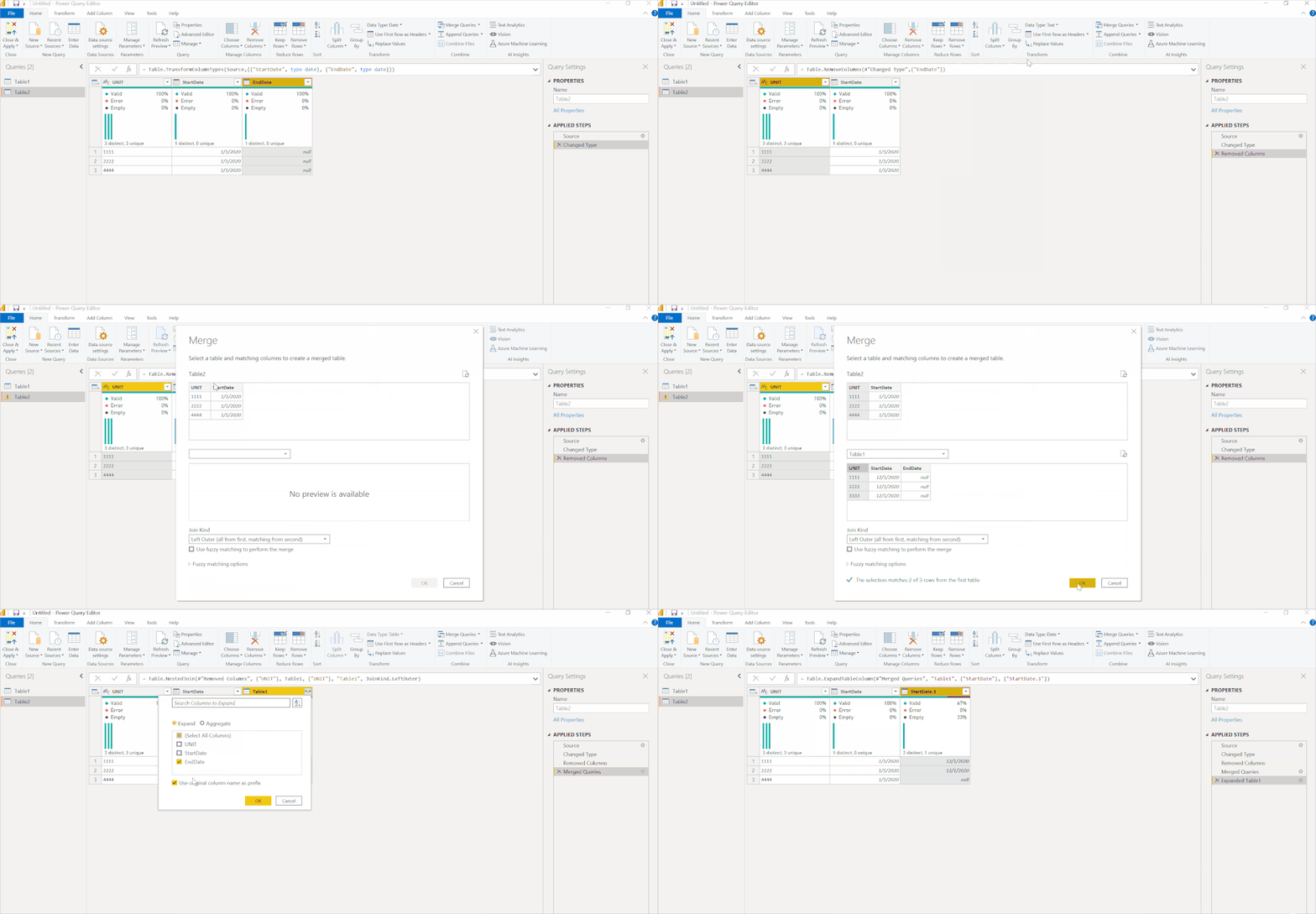
You do this with a merge. What you are doing is thinking like Excel with a vlookup. That can work ok with a few records, or a few thousand records maybe but above that, it will get super slow.
This will perform very well with larger datasets.
DAX is for Analysis. Power Query is for Data Modeling
Proud to be a Super User!
MCSA: BI ReportingYou do this with a merge. What you are doing is thinking like Excel with a vlookup. That can work ok with a few records, or a few thousand records maybe but above that, it will get super slow.
This will perform very well with larger datasets.
DAX is for Analysis. Power Query is for Data Modeling
Proud to be a Super User!
MCSA: BI Reportingthat did the trick thank you very much.
Glad I was able to help @graphIt
DAX is for Analysis. Power Query is for Data Modeling
Proud to be a Super User!
MCSA: BI ReportingCheck out the April 2026 Power BI update to learn about new features.
Sign up to receive a private message when registration opens and key events begin.
If you have recently started exploring Fabric, we'd love to hear how it's going. Your feedback can help with product improvements.
| User | Count |
|---|---|
| 3 | |
| 2 | |
| 2 | |
| 2 | |
| 2 |