This is best Fabric, Power BI, SQL and AI community event. How do we know? The last event sold out! Save €200 with code FABCMTY200.
Register nowJuly 28 - August 9 | Final Round of the Power BI Dataviz World Championships. This is your chance. Learn more
Hello,
I have set of data as in bellow. I would need to add in power query editor another colum which would be calculated according to condition. If ExpenseBasis_ID has "Percentage" in it then it will return the same value as we have in Amount1 column to column Amount2, however if there isn't "Percentage" in column ExpenseBasis_ID it would be using formula (Amount1 *12). Can you please help me with this? Thank you!
| ExpenseBasis_ID | Amount1 | Amount 2 |
| Percentage | 2 | |
| Amount 2 | 5 | |
| Amount 1 | 6 | |
| Percentage | 3 | |
| Amount 4 | 2 | |
| Percentage | 9 |
Solved! Go to Solution.
@matka123499
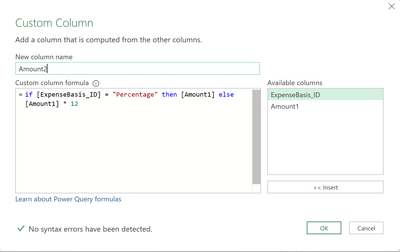
Create a conditional column in Power Query and use the below formula
If the post helps please give a thumbs up
If it solves your issue, please accept it as the solution to help the other members find it more quickly.
Tharun
Hi @matka123499 ,
I would only add to @tharunkumarRTK solution, in the formula box of the custom column in Power Query:
if Text.Contains( [ExpenseBasis_ID], "Percentage" ) then [Amount1] else [Amount1] * 12
This suggestion comes because you state that "If ExpenseBasis_ID has "Percentage" " so I would imagine that the ExpenseBasis column may sometimes have some other characters when its Percentage.
Hope this answer solves your problem!
If you need any additional help please @ me in your reply.
If my reply provided you with a solution, please consider marking it as a solution ✔️ or giving it a kudoe 👍
Thanks!
You can also check out my LinkedIn!
Best regards,
Gonçalo Geraldes
@matka123499
Create a conditional column in Power Query and use the below formula
If the post helps please give a thumbs up
If it solves your issue, please accept it as the solution to help the other members find it more quickly.
Tharun
Thank you!
Join us in Barcelona for FabCon and SQLCon, the Fabric, Power BI, SQL, and AI community event. Save €200 with code FABCMTY200.
If you love stickers, then you will definitely want to check out our community sticker challenge, Barcelona edition!
Check out the July 2026 Power BI update to learn about new features.