Hi All,
I noticed a mismatch in the data from the Power Query and the loaded table in Power BI. Upon further investigation, things became stranger...
All I am attempting is to do is pivot a column in Power Query without aggregation and load it into PBI. The data is correct in Power Query and not in PBI as these screenshots illustrate. I am not using any DAX in the PBI loaded table and it is not related to anything else in the model (yet).
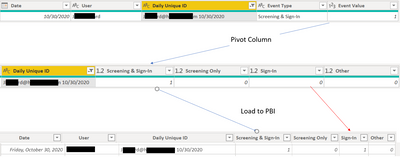
Further, when I filter the user in the question above in Power Query to only load that user row in PBI, the row completely changes...

I have no idea what is going on or how much of the data is impact. Below is the full M Code for the Power Query.
let
    Source = #"Source Data",
    #"Removed Other Columns" = Table.SelectColumns(Source,{"Date", "User", "Daily Unique ID", "Event Type"}),
    #"Added Custom" = Table.AddColumn(#"Removed Other Columns", "Event Value", each 1),
    #"Changed Type" = Table.TransformColumnTypes(#"Added Custom",{{"Event Value", Int64.Type}}),
    #"Pivoted Column" = Table.Pivot(#"Changed Type", List.Distinct(#"Changed Type"[#"Event Type"]), "Event Type", "Event Value"),
    #"Replaced Value" = Table.ReplaceValue(#"Pivoted Column",null,0,Replacer.ReplaceValue,{"Screening & Sign-In", "Screening Only", "Sign-In", "Other"})
in
    #"Replaced Value"


