cancel
Showing results for 
Search instead for 
Did you mean: 

Did you hear? There's a new SQL AI Developer certification (DP-800). Start preparing now and be one of the first to get certified. Register now

Reply
PurdieB
Frequent Visitor

Power Query Text.Contains function to return true when there is a "like" value

I have a table with 2 concatenated columns that I am trying to flag True or False when a text value is in both columns.

Useing Text.Contains I am able so get a correct value when there is an exact match of the search column but not otherwise.


Match = if Text.Contains([Requirement 1], [Held Accomps]) then "True" else "False"


What I would like is something that produces the "DESIRED RESULT" column.


Held Accomps

Requirement 1MatchDESIRED RESULT

RN

RN , RN-TTrueTrue
RNRN , LPN , CCMATrueTrue
RN & ALDPRN , RN-TFalseTrue
CC & RNRN , RN-TFalseTrue
ALDP FalseFalse
RN-T & PALSRN , RN-T , LPNFalseTrue


Any help is appreciated!

1 ACCEPTED SOLUTION
edhans
Community Champion
Community Champion

Try this @PurdieB 


    #"Added Custom" = 
        Table.AddColumn(
            #"Trimmed Text", 
            "Custom", 
            each 
                try
                List.Count(
                    List.Intersect(
                        {
                            List.Transform(Text.Split([Requirement 1], ","), Text.Trim),
                            List.Transform(Text.Split([Held Accomps], "&"), Text.Trim)
                        }
                    ) 
                )>0
                otherwise false


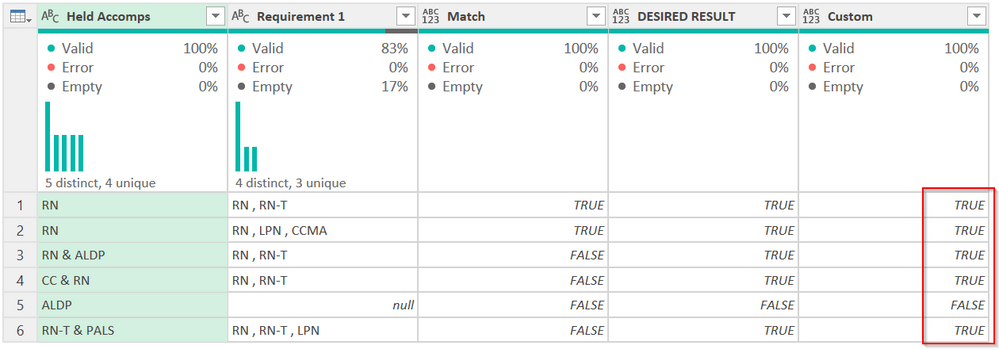
edhans_0-1634666910446.png


You have to parse the values out into lists (the first uses & as a delimiter, the second uses a comma) then see where they intersect, then count the rows. If > 0, then true, else false.


The one with null returns an error as it is an empty list, so the try/otherwise statement converts any error to false.


The above is the M code from the advanced editor. You can just paste this into a new Custom Column, though it will be formatted wierdly.

                try
                List.Count(
                    List.Intersect(
                        {
                            List.Transform(Text.Split([Requirement 1], ","), Text.Trim),
                            List.Transform(Text.Split([Held Accomps], "&"), Text.Trim)
                        }
                    ) 
                )>0
                otherwise false


Did I answer your question? Mark my post as a solution!
Did my answers help arrive at a solution? Give it a kudos by clicking the Thumbs Up!

DAX is for Analysis. Power Query is for Data Modeling


Proud to be a Super User!

MCSA: BI Reporting

View solution in original post

1 REPLY 1
edhans
Community Champion
Community Champion

Try this @PurdieB 


    #"Added Custom" = 
        Table.AddColumn(
            #"Trimmed Text", 
            "Custom", 
            each 
                try
                List.Count(
                    List.Intersect(
                        {
                            List.Transform(Text.Split([Requirement 1], ","), Text.Trim),
                            List.Transform(Text.Split([Held Accomps], "&"), Text.Trim)
                        }
                    ) 
                )>0
                otherwise false


edhans_0-1634666910446.png


You have to parse the values out into lists (the first uses & as a delimiter, the second uses a comma) then see where they intersect, then count the rows. If > 0, then true, else false.


The one with null returns an error as it is an empty list, so the try/otherwise statement converts any error to false.


The above is the M code from the advanced editor. You can just paste this into a new Custom Column, though it will be formatted wierdly.

                try
                List.Count(
                    List.Intersect(
                        {
                            List.Transform(Text.Split([Requirement 1], ","), Text.Trim),
                            List.Transform(Text.Split([Held Accomps], "&"), Text.Trim)
                        }
                    ) 
                )>0
                otherwise false


Did I answer your question? Mark my post as a solution!
Did my answers help arrive at a solution? Give it a kudos by clicking the Thumbs Up!

DAX is for Analysis. Power Query is for Data Modeling


Proud to be a Super User!

MCSA: BI Reporting

Helpful resources

Announcements
April Power BI Update Carousel

Power BI Monthly Update - April 2026

Check out the April 2026 Power BI update to learn about new features.

Fabric SQL PBI Data Days

Data Days 2026 coming soon!

Sign up to receive a private message when registration opens and key events begin.

New to Fabric survey Carousel

New to Fabric Survey

If you have recently started exploring Fabric, we'd love to hear how it's going. Your feedback can help with product improvements.

Power BI DataViz World Championships carousel

Power BI DataViz World Championships - June 2026

A new Power BI DataViz World Championship is coming this June! Don't miss out on submitting your entry.