Join us at FabCon Atlanta from March 16 - 20, 2026, for the ultimate Fabric, Power BI, AI and SQL community-led event. Save $200 with code FABCOMM.
Register now!The Power BI Data Visualization World Championships is back! Get ahead of the game and start preparing now! Learn more
I have a table with 2 concatenated columns that I am trying to flag True or False when a text value is in both columns.
Useing Text.Contains I am able so get a correct value when there is an exact match of the search column but not otherwise.
Match = if Text.Contains([Requirement 1], [Held Accomps]) then "True" else "False"
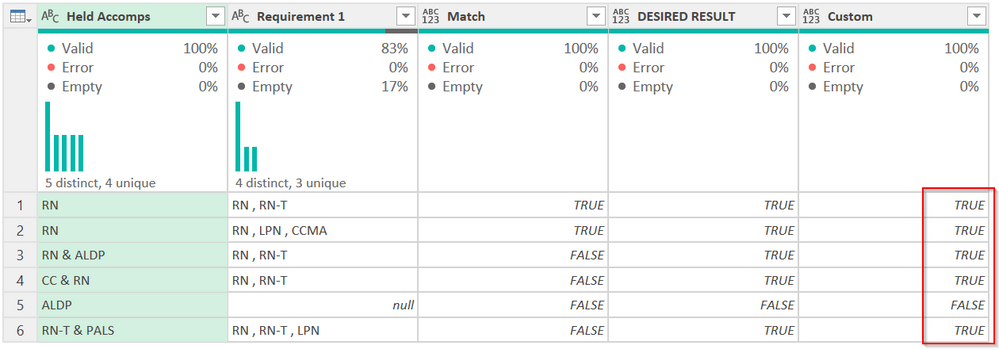
What I would like is something that produces the "DESIRED RESULT" column.
Held Accomps | Requirement 1 | Match | DESIRED RESULT |
RN | RN , RN-T | True | True |
| RN | RN , LPN , CCMA | True | True |
| RN & ALDP | RN , RN-T | False | True |
| CC & RN | RN , RN-T | False | True |
| ALDP | False | False | |
| RN-T & PALS | RN , RN-T , LPN | False | True |
Any help is appreciated!
Solved! Go to Solution.
Try this @PurdieB
#"Added Custom" =
Table.AddColumn(
#"Trimmed Text",
"Custom",
each
try
List.Count(
List.Intersect(
{
List.Transform(Text.Split([Requirement 1], ","), Text.Trim),
List.Transform(Text.Split([Held Accomps], "&"), Text.Trim)
}
)
)>0
otherwise false
You have to parse the values out into lists (the first uses & as a delimiter, the second uses a comma) then see where they intersect, then count the rows. If > 0, then true, else false.
The one with null returns an error as it is an empty list, so the try/otherwise statement converts any error to false.
The above is the M code from the advanced editor. You can just paste this into a new Custom Column, though it will be formatted wierdly.
try
List.Count(
List.Intersect(
{
List.Transform(Text.Split([Requirement 1], ","), Text.Trim),
List.Transform(Text.Split([Held Accomps], "&"), Text.Trim)
}
)
)>0
otherwise false
DAX is for Analysis. Power Query is for Data Modeling
Proud to be a Super User!
MCSA: BI ReportingTry this @PurdieB
#"Added Custom" =
Table.AddColumn(
#"Trimmed Text",
"Custom",
each
try
List.Count(
List.Intersect(
{
List.Transform(Text.Split([Requirement 1], ","), Text.Trim),
List.Transform(Text.Split([Held Accomps], "&"), Text.Trim)
}
)
)>0
otherwise false
You have to parse the values out into lists (the first uses & as a delimiter, the second uses a comma) then see where they intersect, then count the rows. If > 0, then true, else false.
The one with null returns an error as it is an empty list, so the try/otherwise statement converts any error to false.
The above is the M code from the advanced editor. You can just paste this into a new Custom Column, though it will be formatted wierdly.
try
List.Count(
List.Intersect(
{
List.Transform(Text.Split([Requirement 1], ","), Text.Trim),
List.Transform(Text.Split([Held Accomps], "&"), Text.Trim)
}
)
)>0
otherwise false
DAX is for Analysis. Power Query is for Data Modeling
Proud to be a Super User!
MCSA: BI ReportingThe Power BI Data Visualization World Championships is back! Get ahead of the game and start preparing now!
| User | Count |
|---|---|
| 19 | |
| 10 | |
| 9 | |
| 7 | |
| 6 |