Join us at FabCon Atlanta from March 16 - 20, 2026, for the ultimate Fabric, Power BI, AI and SQL community-led event. Save $200 with code FABCOMM.
Register now!Vote for your favorite vizzies from the Power BI Dataviz World Championship submissions. Vote now!
Dear Community,
let
Source = MySQL.Database("77.247.69.170", "concierge_admin_prod", [ReturnSingleDatabase=true]),
concierge_admin_prod_products = Source{[Schema="concierge_admin_prod",Item="products"]}[Data]
in
concierge_admin_prod_products
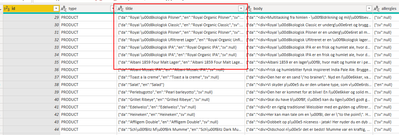
I have this Json String "Title" from an SQL Table.
Firstly I want to "import" this as Json and afterward I can convert it to a table through PowerQuery.
Secondly I want to be able to read the Æ Ø Å because as you can see in the screenshot, I am not able to.
Is anyone able to solve this?
Solved! Go to Solution.
Hi @asamr ,
you can add a column with this formula: Json.Document([title])
This will parse the JSON string and return a record in each row that you can then expand as additional table columns.
For the umlauts, you can try to use a "replacements table" like described here: Multiple replacements or translations in Power BI and Power Query – The BIccountant
Imke Feldmann (The BIccountant)
If you liked my solution, please give it a thumbs up. And if I did answer your question, please mark this post as a solution. Thanks!
How to integrate M-code into your solution -- How to get your questions answered quickly -- How to provide sample data -- Check out more PBI- learning resources here -- Performance Tipps for M-queries
Changing the record of the MySQL function, try to use ENCODING = 65001. I believe that would solve it.
let
Source = MySQL.Database("77.247.69.170", "concierge_admin_prod", [ReturnSingleDatabase=true, Encoding=65001]),
concierge_admin_prod_products = Source{[Schema="concierge_admin_prod",Item="products"]}[Data]
in
concierge_admin_prod_products
Hi @asamr ,
you can add a column with this formula: Json.Document([title])
This will parse the JSON string and return a record in each row that you can then expand as additional table columns.
For the umlauts, you can try to use a "replacements table" like described here: Multiple replacements or translations in Power BI and Power Query – The BIccountant
Imke Feldmann (The BIccountant)
If you liked my solution, please give it a thumbs up. And if I did answer your question, please mark this post as a solution. Thanks!
How to integrate M-code into your solution -- How to get your questions answered quickly -- How to provide sample data -- Check out more PBI- learning resources here -- Performance Tipps for M-queries
Vote for your favorite vizzies from the Power BI World Championship submissions!
If you love stickers, then you will definitely want to check out our Community Sticker Challenge!
Check out the January 2026 Power BI update to learn about new features.
| User | Count |
|---|---|
| 11 | |
| 11 | |
| 6 | |
| 6 | |
| 6 |