This is best Fabric, Power BI, SQL and AI community event. How do we know? The last event sold out! Save €200 with code FABCMTY200.
Register nowA new Data Days event is coming soon! This time we’re going bigger than ever. Fabric, Power BI, SQL, AI and more. Don't miss out.
Dear Community,
let
Source = MySQL.Database("77.247.69.170", "concierge_admin_prod", [ReturnSingleDatabase=true]),
concierge_admin_prod_products = Source{[Schema="concierge_admin_prod",Item="products"]}[Data]
in
concierge_admin_prod_products
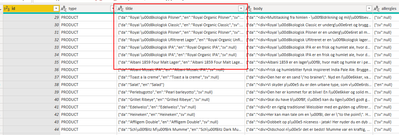
I have this Json String "Title" from an SQL Table.
Firstly I want to "import" this as Json and afterward I can convert it to a table through PowerQuery.
Secondly I want to be able to read the Æ Ø Å because as you can see in the screenshot, I am not able to.
Is anyone able to solve this?
Solved! Go to Solution.
Hi @asamr ,
you can add a column with this formula: Json.Document([title])
This will parse the JSON string and return a record in each row that you can then expand as additional table columns.
For the umlauts, you can try to use a "replacements table" like described here: Multiple replacements or translations in Power BI and Power Query – The BIccountant
Imke Feldmann (The BIccountant)
If you liked my solution, please give it a thumbs up. And if I did answer your question, please mark this post as a solution. Thanks!
How to integrate M-code into your solution -- How to get your questions answered quickly -- How to provide sample data -- Check out more PBI- learning resources here -- Performance Tipps for M-queries
Changing the record of the MySQL function, try to use ENCODING = 65001. I believe that would solve it.
let
Source = MySQL.Database("77.247.69.170", "concierge_admin_prod", [ReturnSingleDatabase=true, Encoding=65001]),
concierge_admin_prod_products = Source{[Schema="concierge_admin_prod",Item="products"]}[Data]
in
concierge_admin_prod_products
Hi @asamr ,
you can add a column with this formula: Json.Document([title])
This will parse the JSON string and return a record in each row that you can then expand as additional table columns.
For the umlauts, you can try to use a "replacements table" like described here: Multiple replacements or translations in Power BI and Power Query – The BIccountant
Imke Feldmann (The BIccountant)
If you liked my solution, please give it a thumbs up. And if I did answer your question, please mark this post as a solution. Thanks!
How to integrate M-code into your solution -- How to get your questions answered quickly -- How to provide sample data -- Check out more PBI- learning resources here -- Performance Tipps for M-queries
Check out the May 2026 Power BI update to learn about new features.
Sign up to receive a private message when registration opens and key events begin.
If you have recently started exploring Fabric, we'd love to hear how it's going. Your feedback can help with product improvements.