Don't miss your chance to take exam DP-600 or DP-700 on us!
Request nowLearn from the best! Meet the four finalists headed to the FINALS of the Power BI Dataviz World Championships! Register now
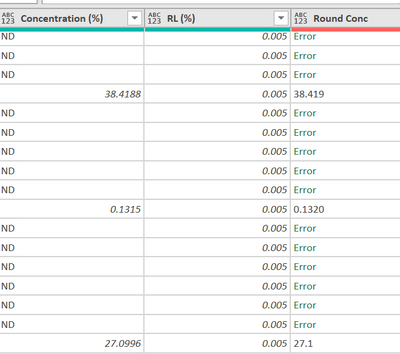
I am trying to use "Round Conc" column to round any number in "Concentration (%)" to 3 decimal place.
Expectation:
38.4188 -> 38.419 [now it is correct]
0.1315 -> 0.132 [but it now give 0.1320]
27.0996 -> 27.100 [but it now give 27.1]
The code I now use is:
#"Round Conc" = Table.AddColumn(#"Renamed as report - before round", "Round Conc", each Number.ToText(Number.Round(Number.From([#"Concentration (%)"]), 3))),
I have tried changing the data type but it does not work.
I now have to change it to text, split by ".", format the digits to the right of dot to 3 characters. It solves the 27.1 but still 0.1320 is not solved.
Any idea? Thank you all.
Solved! Go to Solution.
Hello, @carmenng Number.ToText function has an optional format parameter. Read function description on MS site. Try this:
Number.ToText(Number.Round(Number.From([#"Concentration (%)"]), 3), "N3")
Hello, @carmenng Number.ToText function has an optional format parameter. Read function description on MS site. Try this:
Number.ToText(Number.Round(Number.From([#"Concentration (%)"]), 3), "N3")
Somebody had a similar issue some time ago. Take a look at:
It seems the Number.ToText and Text.From functions both create the same situation that your dealing with.
Share feedback directly with Fabric product managers, participate in targeted research studies and influence the Fabric roadmap.
Check out the February 2026 Power BI update to learn about new features.
| User | Count |
|---|---|
| 9 | |
| 9 | |
| 9 | |
| 8 | |
| 6 |