This is best Fabric, Power BI, SQL and AI community event. How do we know? The last event sold out! Save €200 with code FABCMTY200.
Register nowA new Data Days event is coming soon! This time we’re going bigger than ever. Fabric, Power BI, SQL, AI and more. Don't miss out.
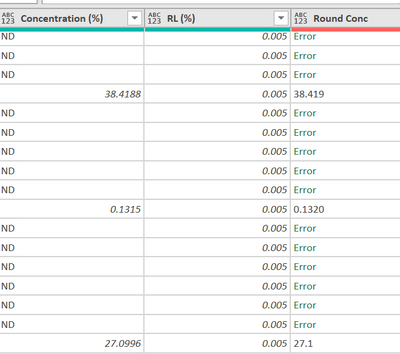
I am trying to use "Round Conc" column to round any number in "Concentration (%)" to 3 decimal place.
Expectation:
38.4188 -> 38.419 [now it is correct]
0.1315 -> 0.132 [but it now give 0.1320]
27.0996 -> 27.100 [but it now give 27.1]
The code I now use is:
#"Round Conc" = Table.AddColumn(#"Renamed as report - before round", "Round Conc", each Number.ToText(Number.Round(Number.From([#"Concentration (%)"]), 3))),
I have tried changing the data type but it does not work.
I now have to change it to text, split by ".", format the digits to the right of dot to 3 characters. It solves the 27.1 but still 0.1320 is not solved.
Any idea? Thank you all.
Solved! Go to Solution.
Hello, @carmenng Number.ToText function has an optional format parameter. Read function description on MS site. Try this:
Number.ToText(Number.Round(Number.From([#"Concentration (%)"]), 3), "N3")
Hello, @carmenng Number.ToText function has an optional format parameter. Read function description on MS site. Try this:
Number.ToText(Number.Round(Number.From([#"Concentration (%)"]), 3), "N3")
Somebody had a similar issue some time ago. Take a look at:
It seems the Number.ToText and Text.From functions both create the same situation that your dealing with.
Check out the May 2026 Power BI update to learn about new features.
Sign up to receive a private message when registration opens and key events begin.
If you have recently started exploring Fabric, we'd love to hear how it's going. Your feedback can help with product improvements.