cancel
Showing results for 
Search instead for 
Did you mean: 

Learn from the best! Meet the four finalists headed to the FINALS of the Power BI Dataviz World Championships! Register now

Reply
101Mathew
Resolver II
Resolver II

Power Query - From File Performance

Hi All,


Can you help, I'm running the latest Power BI Desktop.  I'm getting data from a folder.  This folder thousands of files.


My thought was to filter out the unrequired files, via steps, then reference these. for the following queries


  1.  List of All Files
  2.  List of All TXT files
  3.  List of All Transactions files
  4.  etc...

I would then combine the files, of interest into their own query (all transactions for example); however the performance on filtering the list of files current, is very very slow, any suggestions


If this a problem with Power Query, my technique etc...


Regards,

Mathew

2 REPLIES 2
v-piga-msft
Resident Rockstar
Resident Rockstar

Hi @101Mathew ,

If I understand your requirement correctly that you want to filter out the unrequired files in Query Editor when get data from Folder connector.

If it is, you could use the query below to filter your files.

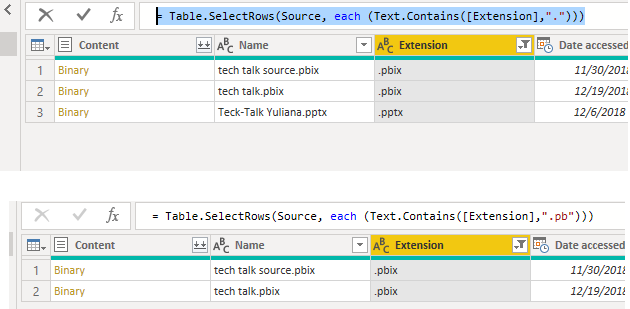
= Table.SelectRows(Source, each (Text.Contains([Extension],".")))
= Table.SelectRows(Source, each (Text.Contains([Extension],".txt")))

Here is the test output.

Untitled.png

You also could modify the value in "" based on your requirement.

Best  Regards,

Cherry


Community Support Team _ Cherry Gao
If this post helps, then please consider Accept it as the solution to help the other members find it more quickly.

Hi @v-piga-msft ,


Thanks for taking the time to respond


I understand how to filter, the problem is the performance, it's SO SLOW.  It is going through 1000s of files but still


So I'm unsure if my technique of all files, reference all file, then filter to the next sections, then reference and filter the next section is causing the issue.


Regards,

Helpful resources

Announcements
Power BI DataViz World Championships carousel

Power BI DataViz World Championships - June 2026

A new Power BI DataViz World Championship is coming this June! Don't miss out on submitting your entry.

Join our Fabric User Panel

Join our Fabric User Panel

Share feedback directly with Fabric product managers, participate in targeted research studies and influence the Fabric roadmap.

March Power BI Update Carousel

Power BI Community Update - March 2026

Check out the March 2026 Power BI update to learn about new features.