This is best Fabric, Power BI, SQL and AI community event. How do we know? The last event sold out! Save €200 with code FABCMTY200.
Register nowA new Data Days event is coming soon! This time we’re going bigger than ever. Fabric, Power BI, SQL, AI and more. Don't miss out.
Hi all,
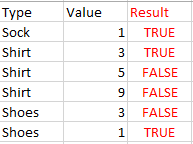
I'd like to create a column that returns a True / False based on the minimum value in a column per each type. I'm not the best at explaining - please take a look at the example:
Thanks for taking a look!
Solved! Go to Solution.
Here is a step by step way to do it in Power Query:
1) Group by the columns to get the max value, somethin like below:
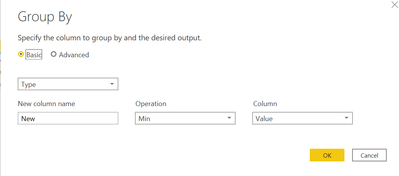
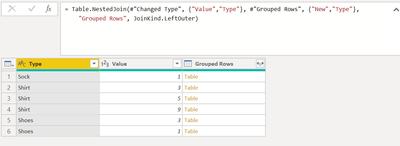
2) Apply a left outer join to merge the main table and the grouped by table:
= Table.NestedJoin(#"Changed Type", {"Value","Type"}, #"Grouped Rows", {"New","Type"}, "Grouped Rows", JoinKind.LeftOuter)3) Now expand the columns to get final Result column:
= Table.ExpandTableColumn(#"Merged Queries", "Grouped Rows", {"New"}, {"Result"})
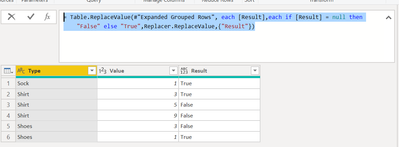
4) Now replace the values as per your requirement
= Table.ReplaceValue(#"Expanded Grouped Rows", each [Result],each if [Result] = null then "False" else "True",Replacer.ReplaceValue,{"Result"})Complete M Code:
let
Source = Table.FromRows(Json.Document(Binary.Decompress(Binary.FromText("i45WCs5PzlbSUTJUitUBcjIyi0qAPGMUnikKzxLKy08tRlIJ4QFNiQUA", BinaryEncoding.Base64), Compression.Deflate)), let _t = ((type nullable text) meta [Serialized.Text = true]) in type table [Type = _t, Value = _t]),
#"Changed Type" = Table.TransformColumnTypes(Source,{{"Type", type text}, {"Value", Int64.Type}}),
#"Grouped Rows" = Table.Group(#"Changed Type", {"Type"}, {{"New", each List.Min([Value]), type nullable number}}),
#"Merged Queries" = Table.NestedJoin(#"Changed Type", {"Value","Type"}, #"Grouped Rows", {"New","Type"}, "Grouped Rows", JoinKind.LeftOuter),
#"Expanded Grouped Rows" = Table.ExpandTableColumn(#"Merged Queries", "Grouped Rows", {"New"}, {"Result"}),
#"Replaced Value" = Table.ReplaceValue(#"Expanded Grouped Rows", each [Result],each if [Result] = null then "False" else "True",Replacer.ReplaceValue,{"Result"})
in
#"Replaced Value"
Here is a step by step way to do it in Power Query:
1) Group by the columns to get the max value, somethin like below:
2) Apply a left outer join to merge the main table and the grouped by table:
= Table.NestedJoin(#"Changed Type", {"Value","Type"}, #"Grouped Rows", {"New","Type"}, "Grouped Rows", JoinKind.LeftOuter)3) Now expand the columns to get final Result column:
= Table.ExpandTableColumn(#"Merged Queries", "Grouped Rows", {"New"}, {"Result"})
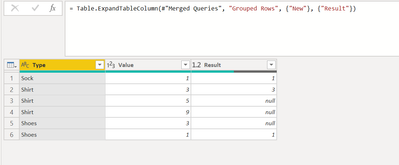
4) Now replace the values as per your requirement
= Table.ReplaceValue(#"Expanded Grouped Rows", each [Result],each if [Result] = null then "False" else "True",Replacer.ReplaceValue,{"Result"})Complete M Code:
let
Source = Table.FromRows(Json.Document(Binary.Decompress(Binary.FromText("i45WCs5PzlbSUTJUitUBcjIyi0qAPGMUnikKzxLKy08tRlIJ4QFNiQUA", BinaryEncoding.Base64), Compression.Deflate)), let _t = ((type nullable text) meta [Serialized.Text = true]) in type table [Type = _t, Value = _t]),
#"Changed Type" = Table.TransformColumnTypes(Source,{{"Type", type text}, {"Value", Int64.Type}}),
#"Grouped Rows" = Table.Group(#"Changed Type", {"Type"}, {{"New", each List.Min([Value]), type nullable number}}),
#"Merged Queries" = Table.NestedJoin(#"Changed Type", {"Value","Type"}, #"Grouped Rows", {"New","Type"}, "Grouped Rows", JoinKind.LeftOuter),
#"Expanded Grouped Rows" = Table.ExpandTableColumn(#"Merged Queries", "Grouped Rows", {"New"}, {"Result"}),
#"Replaced Value" = Table.ReplaceValue(#"Expanded Grouped Rows", each [Result],each if [Result] = null then "False" else "True",Replacer.ReplaceValue,{"Result"})
in
#"Replaced Value"
Hi @peterso
Paste it to Advanced Editor:
let
Source = Table.FromRows(
Json.Document(
Binary.Decompress(
Binary.FromText(
"i45WCs5PzlbSUTJUitUBcjIyi0qAPGMUnikKzxLKy08tRlIJ4QFNiQUA",
BinaryEncoding.Base64
),
Compression.Deflate
)
),
let
_t = ((type nullable text) meta [Serialized.Text = true])
in
type table [Type = _t, Value = _t]
),
#"Changed Type" = Table.TransformColumnTypes(Source, {{"Type", type text}, {"Value", Int64.Type}}),
MinValue = Table.Group(
#"Changed Type",
{"Type"},
{{"Min", each List.Min([Value]), type nullable number}}
),
#"Merged Queries" = Table.NestedJoin(
#"Changed Type",
{"Type"},
MinValue,
{"Type"},
"Changed Type",
JoinKind.LeftOuter
),
#"Expanded Changed Type" = Table.ExpandTableColumn(
#"Merged Queries",
"Changed Type",
{"Min"},
{"Min"}
),
#"Added Custom" = Table.AddColumn(#"Expanded Changed Type", "Result", each [Value] = [Min]),
#"Removed Columns" = Table.RemoveColumns(#"Added Custom", {"Min"})
in
#"Removed Columns"
Check out the May 2026 Power BI update to learn about new features.
Sign up to receive a private message when registration opens and key events begin.
If you have recently started exploring Fabric, we'd love to hear how it's going. Your feedback can help with product improvements.
| User | Count |
|---|---|
| 4 | |
| 3 | |
| 2 | |
| 2 | |
| 1 |