cancel
Showing results for 
Search instead for 
Did you mean: 

The Power BI Data Visualization World Championships is back! Get ahead of the game and start preparing now! Learn more

Reply
peterso
Helper II
Helper II

Power Query Custom Column HELP

Hi all,


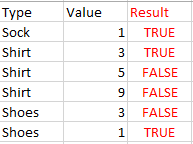
I'd like to create a column that returns a True / False based on the minimum value in a column per each type. I'm not the best at explaining - please take a look at the example:


peterso_0-1613955829285.png


Thanks for taking a look!

1 ACCEPTED SOLUTION
PC2790
Community Champion
Community Champion

Here is a step by step way to do it in Power Query:

1) Group by the columns to get the max value, somethin like below:
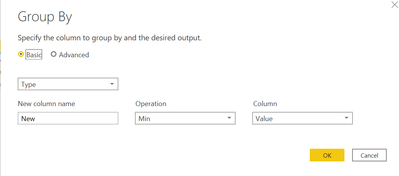
PC2790_0-1613973141662.png

PC2790_1-1613973333311.png


2) Apply a left outer join to merge the main table and the grouped by table:

= Table.NestedJoin(#"Changed Type", {"Value","Type"}, #"Grouped Rows", {"New","Type"}, "Grouped Rows", JoinKind.LeftOuter)

PC2790_2-1613973607001.png

3) Now expand the columns to get final Result column:

= Table.ExpandTableColumn(#"Merged Queries", "Grouped Rows", {"New"}, {"Result"})


PC2790_3-1613973960607.png

4) Now replace the values as per your requirement

= Table.ReplaceValue(#"Expanded Grouped Rows", each [Result],each if [Result] = null then "False" else "True",Replacer.ReplaceValue,{"Result"})

PC2790_4-1613974019351.png

Complete M Code:

let
    Source = Table.FromRows(Json.Document(Binary.Decompress(Binary.FromText("i45WCs5PzlbSUTJUitUBcjIyi0qAPGMUnikKzxLKy08tRlIJ4QFNiQUA", BinaryEncoding.Base64), Compression.Deflate)), let _t = ((type nullable text) meta [Serialized.Text = true]) in type table [Type = _t, Value = _t]),
    #"Changed Type" = Table.TransformColumnTypes(Source,{{"Type", type text}, {"Value", Int64.Type}}),
    #"Grouped Rows" = Table.Group(#"Changed Type", {"Type"}, {{"New", each List.Min([Value]), type nullable number}}),
    #"Merged Queries" = Table.NestedJoin(#"Changed Type", {"Value","Type"}, #"Grouped Rows", {"New","Type"}, "Grouped Rows", JoinKind.LeftOuter),
    #"Expanded Grouped Rows" = Table.ExpandTableColumn(#"Merged Queries", "Grouped Rows", {"New"}, {"Result"}),
    #"Replaced Value" = Table.ReplaceValue(#"Expanded Grouped Rows", each [Result],each if [Result] = null then "False" else "True",Replacer.ReplaceValue,{"Result"})
in
    #"Replaced Value"

View solution in original post

2 REPLIES 2
PC2790
Community Champion
Community Champion

Here is a step by step way to do it in Power Query:

1) Group by the columns to get the max value, somethin like below:

PC2790_0-1613973141662.png

PC2790_1-1613973333311.png


2) Apply a left outer join to merge the main table and the grouped by table:

= Table.NestedJoin(#"Changed Type", {"Value","Type"}, #"Grouped Rows", {"New","Type"}, "Grouped Rows", JoinKind.LeftOuter)
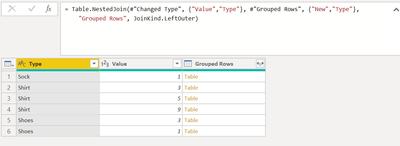
PC2790_2-1613973607001.png

3) Now expand the columns to get final Result column:

= Table.ExpandTableColumn(#"Merged Queries", "Grouped Rows", {"New"}, {"Result"})
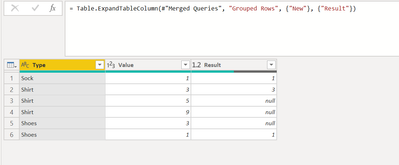
 

PC2790_3-1613973960607.png

4) Now replace the values as per your requirement

= Table.ReplaceValue(#"Expanded Grouped Rows", each [Result],each if [Result] = null then "False" else "True",Replacer.ReplaceValue,{"Result"})
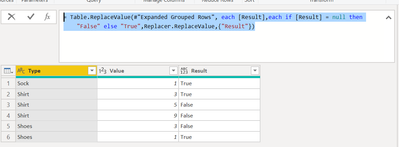
PC2790_4-1613974019351.png

Complete M Code:

let
    Source = Table.FromRows(Json.Document(Binary.Decompress(Binary.FromText("i45WCs5PzlbSUTJUitUBcjIyi0qAPGMUnikKzxLKy08tRlIJ4QFNiQUA", BinaryEncoding.Base64), Compression.Deflate)), let _t = ((type nullable text) meta [Serialized.Text = true]) in type table [Type = _t, Value = _t]),
    #"Changed Type" = Table.TransformColumnTypes(Source,{{"Type", type text}, {"Value", Int64.Type}}),
    #"Grouped Rows" = Table.Group(#"Changed Type", {"Type"}, {{"New", each List.Min([Value]), type nullable number}}),
    #"Merged Queries" = Table.NestedJoin(#"Changed Type", {"Value","Type"}, #"Grouped Rows", {"New","Type"}, "Grouped Rows", JoinKind.LeftOuter),
    #"Expanded Grouped Rows" = Table.ExpandTableColumn(#"Merged Queries", "Grouped Rows", {"New"}, {"Result"}),
    #"Replaced Value" = Table.ReplaceValue(#"Expanded Grouped Rows", each [Result],each if [Result] = null then "False" else "True",Replacer.ReplaceValue,{"Result"})
in
    #"Replaced Value"
Vera_33
Resident Rockstar
Resident Rockstar

Hi @peterso 


Paste it to Advanced Editor:


let
  Source = Table.FromRows(
    Json.Document(
      Binary.Decompress(
        Binary.FromText(
          "i45WCs5PzlbSUTJUitUBcjIyi0qAPGMUnikKzxLKy08tRlIJ4QFNiQUA",
          BinaryEncoding.Base64
        ),
        Compression.Deflate
      )
    ),
    let
      _t = ((type nullable text) meta [Serialized.Text = true])
    in
      type table [Type = _t, Value = _t]
  ),
  #"Changed Type" = Table.TransformColumnTypes(Source, {{"Type", type text}, {"Value", Int64.Type}}),
  MinValue = Table.Group(
    #"Changed Type",
    {"Type"},
    {{"Min", each List.Min([Value]), type nullable number}}
  ),
  #"Merged Queries" = Table.NestedJoin(
    #"Changed Type",
    {"Type"},
    MinValue,
    {"Type"},
    "Changed Type",
    JoinKind.LeftOuter
  ),
  #"Expanded Changed Type" = Table.ExpandTableColumn(
    #"Merged Queries",
    "Changed Type",
    {"Min"},
    {"Min"}
  ),
  #"Added Custom" = Table.AddColumn(#"Expanded Changed Type", "Result", each [Value] = [Min]),
  #"Removed Columns" = Table.RemoveColumns(#"Added Custom", {"Min"})
in
  #"Removed Columns"

Helpful resources

Announcements
Power BI DataViz World Championships

Power BI Dataviz World Championships

The Power BI Data Visualization World Championships is back! Get ahead of the game and start preparing now!

December 2025 Power BI Update Carousel

Power BI Monthly Update - December 2025

Check out the December 2025 Power BI Holiday Recap!

FabCon Atlanta 2026 carousel

FabCon Atlanta 2026

Join us at FabCon Atlanta, March 16-20, for the ultimate Fabric, Power BI, AI and SQL community-led event. Save $200 with code FABCOMM.