cancel
Showing results for 
Search instead for 
Did you mean: 

Join the FabCon + SQLCon recap series. Up next: Power BI, Real-Time Intelligence, IQ and AI, and Data Factory take center stage. All sessions are available on-demand after the live show. Register now

Reply
FrankWoody
Helper I
Helper I

Power Challenge

Hello everyone, I hope you are all well.
I'm developing a project that I need to track the progress of my activities. The connection to my database takes place in real time directly from Ms planner, to do this monitoring so I thought of the following method.
1st I have a table that connects me directly with planner. So this is tb1.
2nd I duplicated the tb1 and created the tb2, in the tb2 I disabled the update so that it would serve as a history that I can use to compare the progress of the tb1.
3rd However, it may be possible to add new tasks on tb1 that I don't have on tb2, so I need to add this information on tb2 and save this information in it for the next updates.
I've thought about using dax functions to create custom tables, but it still didn't work out, I wanted to know if it's possible to do this manipulation with Dax or Powerquery. Share ideas and methods I'm open to suggestions Thank you all.

Vijay_A_Verma
@Vijay_A_Verma 

1 ACCEPTED SOLUTION

Hi @FrankWoodyblue ,


I think you may have to use R/Python to export data as snapshot of historical data when the data source is refreshed.

Schedule Automated Data Exports from Power BI using a simple R/Python Script 


Best Regards,
Winniz


View solution in original post

4 REPLIES 4
PaulMan
New Member

For assistance please. 


Im new user of power bi and I can't seem to find the a way to resolve the issue in transforming a data. 


So I have worked on some datas from a work laptop, and i wish to continue the work from my home laptop. All my data are in one xls sheeet which has a different tabs. When i open the file from my home laptop, it does not read the source. 


Thanks in advance.

FrankWoodyblue
Frequent Visitor

This really helps, however, when you bring up a tasks D, value 6. when the next update occurs and there is some change in the Value of D, I won't be able to track what the previous value was to make a comparison, you know?

Hi @FrankWoodyblue ,


I think you may have to use R/Python to export data as snapshot of historical data when the data source is refreshed.

Schedule Automated Data Exports from Power BI using a simple R/Python Script 


Best Regards,
Winniz


v-kkf-msft
Community Support
Community Support

Hi @FrankWoody ,


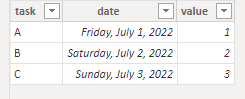
Please use DAX to create a new table.


newtable2 =
UNION ( Table2, FILTER ( Table1, NOT Table1[task] IN VALUES ( Table2[task] ) ) )

Test results:
After updating the data source, Table 1:

vkkfmsft_0-1657679124451.png

Table 2:

vkkfmsft_1-1657679140230.png

newtable 2:

vkkfmsft_2-1657679176793.png


If the problem is still not resolved, please provide detailed error information or the expected result you expect. Let me know immediately, looking forward to your reply.
Best Regards,
Winniz
If this post helps, then please consider Accept it as the solution to help the other members find it more quickly.

Helpful resources

Announcements
April Power BI Update Carousel

Power BI Monthly Update - April 2026

Check out the April 2026 Power BI update to learn about new features.

New to Fabric survey Carousel

New to Fabric Survey

If you have recently started exploring Fabric, we'd love to hear how it's going. Your feedback can help with product improvements.

Power BI DataViz World Championships carousel

Power BI DataViz World Championships - June 2026

A new Power BI DataViz World Championship is coming this June! Don't miss out on submitting your entry.

FabCon and SQLCon Highlights Carousel

FabCon &SQLCon Highlights

Experience the highlights from FabCon & SQLCon, available live and on-demand starting April 14th.