This time we’re going bigger than ever. Fabric, Power BI, SQL, AI and more. We're covering it all. You won't want to miss it.
Learn moreLevel up your Power BI skills this month - build one visual each week and tell better stories with data! Get started
Hello I have a general question:
Initial situation:
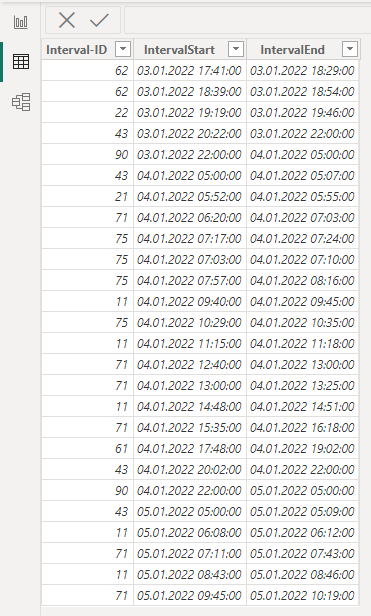
Excel File 1 - Production Time:
The viewing period spans one month. The period is segmented into various intervals. These intervals are recorded down to the second.
For example: 03.01.2022 17:55:02 – 03.01.2022 18:10:23
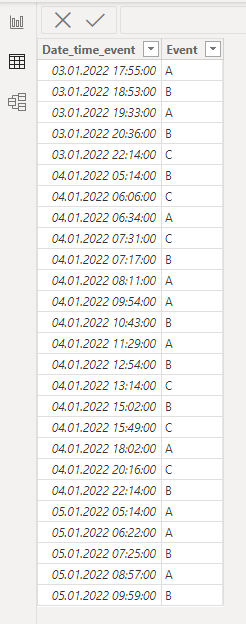
Excel File 2 - Errors:
This file contains documented error messages distributed throughout the entire day.
For example: 03.01.2022 18:00:00
Goal:
My objective is to derive variables indicating the count of errors generated per production time interval within a single day.
For example: 300 errors/production time one day
Question:
How can I generate the vaiable for each day in a mo
nth?
I`m a beginner in this topic. It would be nice if you could help me take a first step in the right direction.
Solved! Go to Solution.
Hello, @Sebatian
let
events_table = your_events_table,
interval_table = your_intervals_table,
event = #table(
{"type", "value"},
{
{"event", events_table[Date_time_event]},
{"start", interval_table[IntervalStart]},
{"end", interval_table[IntervalEnd]}
}
),
expand = Table.ExpandListColumn(event, "value"),
sort = Table.Sort(expand,{{"value", Order.Ascending}}),
g = Table.Group(
sort, "type",
{{"events", (x) => List.Count(List.Select(x[type], (w) => w = "event"))}, {"date", (x) => Date.From(x{0}[value])}},
GroupKind.Local,
(s, c) => Number.From(List.Contains({"start", "end"}, c))),
filter_start = Table.SelectRows(g, each ([type] = "start")),
g2 = Table.Group(filter_start, {"date"}, {{"events", each List.Sum([events]), type number}})
in
g2
Hello, @Sebatian
let
events_table = your_events_table,
interval_table = your_intervals_table,
event = #table(
{"type", "value"},
{
{"event", events_table[Date_time_event]},
{"start", interval_table[IntervalStart]},
{"end", interval_table[IntervalEnd]}
}
),
expand = Table.ExpandListColumn(event, "value"),
sort = Table.Sort(expand,{{"value", Order.Ascending}}),
g = Table.Group(
sort, "type",
{{"events", (x) => List.Count(List.Select(x[type], (w) => w = "event"))}, {"date", (x) => Date.From(x{0}[value])}},
GroupKind.Local,
(s, c) => Number.From(List.Contains({"start", "end"}, c))),
filter_start = Table.SelectRows(g, each ([type] = "start")),
g2 = Table.Group(filter_start, {"date"}, {{"events", each List.Sum([events]), type number}})
in
g2
Thanks for the quick response!! i will try it 🙂
Check out the April 2026 Power BI update to learn about new features.
Sign up to receive a private message when registration opens and key events begin.
If you have recently started exploring Fabric, we'd love to hear how it's going. Your feedback can help with product improvements.