Get certified for free when you join Fabric Data Days 2026 and dive into Fabric, Power BI, SQL, AI, and other essential data skills.
Join nowData Days is here! Join us now for 60+ days of learning, challenges, and connection. Learn more
Hello I have a general question:
Initial situation:
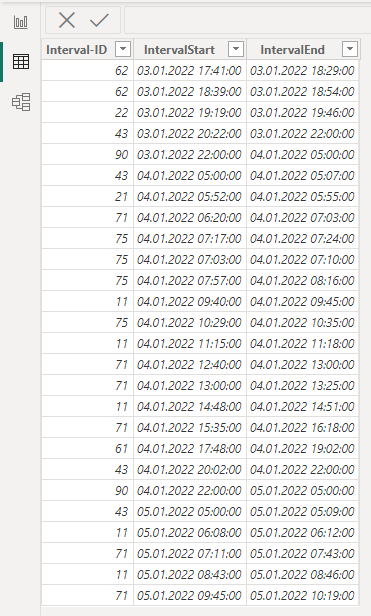
Excel File 1 - Production Time:
The viewing period spans one month. The period is segmented into various intervals. These intervals are recorded down to the second.
For example: 03.01.2022 17:55:02 – 03.01.2022 18:10:23
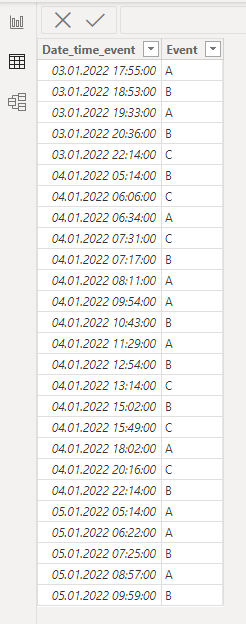
Excel File 2 - Errors:
This file contains documented error messages distributed throughout the entire day.
For example: 03.01.2022 18:00:00
Goal:
My objective is to derive variables indicating the count of errors generated per production time interval within a single day.
For example: 300 errors/production time one day
Question:
How can I generate the vaiable for each day in a mo
nth?
I`m a beginner in this topic. It would be nice if you could help me take a first step in the right direction.
Solved! Go to Solution.
Hello, @Sebatian
let
events_table = your_events_table,
interval_table = your_intervals_table,
event = #table(
{"type", "value"},
{
{"event", events_table[Date_time_event]},
{"start", interval_table[IntervalStart]},
{"end", interval_table[IntervalEnd]}
}
),
expand = Table.ExpandListColumn(event, "value"),
sort = Table.Sort(expand,{{"value", Order.Ascending}}),
g = Table.Group(
sort, "type",
{{"events", (x) => List.Count(List.Select(x[type], (w) => w = "event"))}, {"date", (x) => Date.From(x{0}[value])}},
GroupKind.Local,
(s, c) => Number.From(List.Contains({"start", "end"}, c))),
filter_start = Table.SelectRows(g, each ([type] = "start")),
g2 = Table.Group(filter_start, {"date"}, {{"events", each List.Sum([events]), type number}})
in
g2
Hello, @Sebatian
let
events_table = your_events_table,
interval_table = your_intervals_table,
event = #table(
{"type", "value"},
{
{"event", events_table[Date_time_event]},
{"start", interval_table[IntervalStart]},
{"end", interval_table[IntervalEnd]}
}
),
expand = Table.ExpandListColumn(event, "value"),
sort = Table.Sort(expand,{{"value", Order.Ascending}}),
g = Table.Group(
sort, "type",
{{"events", (x) => List.Count(List.Select(x[type], (w) => w = "event"))}, {"date", (x) => Date.From(x{0}[value])}},
GroupKind.Local,
(s, c) => Number.From(List.Contains({"start", "end"}, c))),
filter_start = Table.SelectRows(g, each ([type] = "start")),
g2 = Table.Group(filter_start, {"date"}, {{"events", each List.Sum([events]), type number}})
in
g2
Thanks for the quick response!! i will try it 🙂
Don't miss out on Data Days, June 15 through August 7. Learn Fabric, Power BI, SQL, AI and more.
Check out the May 2026 Power BI update to learn about new features.
| User | Count |
|---|---|
| 5 | |
| 4 | |
| 3 | |
| 2 | |
| 1 |
| User | Count |
|---|---|
| 11 | |
| 11 | |
| 5 | |
| 4 | |
| 3 |