Get certified for free when you join Fabric Data Days 2026 and dive into Fabric, Power BI, SQL, AI, and other essential data skills.
Join nowJuly 7 - July 17 | Round 2 of the Power BI Dataviz World Championships. Don't miss your chance! Learn more
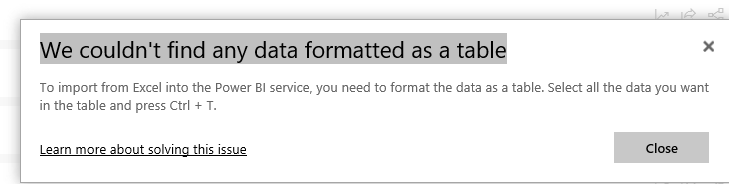
Why does my Excel Data need to be in Tables in PRO. It does not require this in Desktop? Painful to try and publish some Charts. Tables cause problems and errors in my workbook?
Will this change?
Solved! Go to Solution.
@Jhwoods,
Please take a look at the following online articles. It requires to format data in table if you directly connect to Excel workbook in Power BI Sevice.
https://docs.microsoft.com/en-us/power-bi/service-admin-troubleshoot-excel-workbook-data
https://docs.microsoft.com/en-us/power-bi/service-excel-workbook-files
Regards,
Lydia
@Jhwoods,
Please take a look at the following online articles. It requires to format data in table if you directly connect to Excel workbook in Power BI Sevice.
https://docs.microsoft.com/en-us/power-bi/service-admin-troubleshoot-excel-workbook-data
https://docs.microsoft.com/en-us/power-bi/service-excel-workbook-files
Regards,
Lydia
'Power BI PRO' is the standard Power BI Desktop software. It just means you're using a Pro license rather than Premium Capacity.
Are you referring to 'Power Pivot for Excel' requiring data to be in a table for it to be consumed by Power Query?
Join us in Barcelona for FabCon and SQLCon, the Fabric, Power BI, SQL, and AI community event. Save €200 with code FABCMTY200.
Join Fabric Data Days 2026: 60 days of free live/on-demand sessions, challenges, study groups, and certification opportunities.