We've captured the moments from FabCon & SQLCon that everyone is talking about, and we are bringing them to the community, live and on-demand. Starts on April 14th. Register now
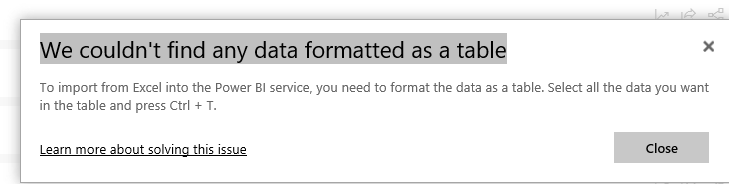
Why does my Excel Data need to be in Tables in PRO. It does not require this in Desktop? Painful to try and publish some Charts. Tables cause problems and errors in my workbook?
Will this change?
Solved! Go to Solution.
@Jhwoods,
Please take a look at the following online articles. It requires to format data in table if you directly connect to Excel workbook in Power BI Sevice.
https://docs.microsoft.com/en-us/power-bi/service-admin-troubleshoot-excel-workbook-data
https://docs.microsoft.com/en-us/power-bi/service-excel-workbook-files
Regards,
Lydia
@Jhwoods,
Please take a look at the following online articles. It requires to format data in table if you directly connect to Excel workbook in Power BI Sevice.
https://docs.microsoft.com/en-us/power-bi/service-admin-troubleshoot-excel-workbook-data
https://docs.microsoft.com/en-us/power-bi/service-excel-workbook-files
Regards,
Lydia
'Power BI PRO' is the standard Power BI Desktop software. It just means you're using a Pro license rather than Premium Capacity.
Are you referring to 'Power Pivot for Excel' requiring data to be in a table for it to be consumed by Power Query?
If you have recently started exploring Fabric, we'd love to hear how it's going. Your feedback can help with product improvements.
A new Power BI DataViz World Championship is coming this June! Don't miss out on submitting your entry.
Share feedback directly with Fabric product managers, participate in targeted research studies and influence the Fabric roadmap.
| User | Count |
|---|---|
| 6 | |
| 4 | |
| 3 | |
| 2 | |
| 2 |
| User | Count |
|---|---|
| 11 | |
| 10 | |
| 7 | |
| 7 | |
| 6 |