Get certified for free when you join Fabric Data Days 2026 and dive into Fabric, Power BI, SQL, AI, and other essential data skills.
Join nowJuly 7 - July 17 | Round 2 of the Power BI Dataviz World Championships. Don't miss your chance! Learn more
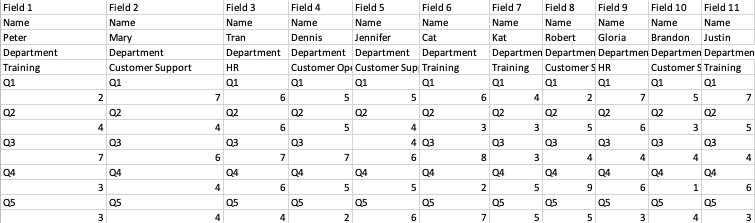
Hello I have given this messy data as attached:
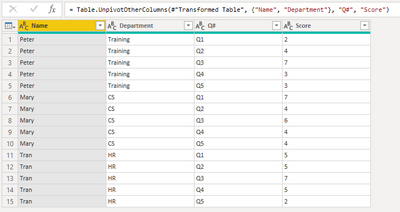
What if I want to convert this into like the following, what should I do?
Solved! Go to Solution.
@ringocheng618 , you might want to try,
let
Source = Table.FromRows(Json.Document(Binary.Decompress(Binary.FromText("i45W8kvMTVXSQaFidaKVAlJLUouAAr6JRZVAKqQoMQ8s7pJakFhUkpuaVwIUxcUBKQTqyMzLzEsHyjgHAwmPILBwoCGQDSNAAkZApjkQm0KkQVwYARIwATJNENLGIBkoARIA6TQDmwCWBqmEESABY1TdpiAZKIEsDbQqFgA=", BinaryEncoding.Base64), Compression.Deflate)), let _t = ((type nullable text) meta [Serialized.Text = true]) in type table [Column1 = _t, Column2 = _t, Column3 = _t]),
#"Transformed Table" = Table.Combine(List.Transform(Table.ToColumns(Source), each Table.PromoteHeaders(Table.FromColumns(List.Split(_,2))))),
#"Unpivoted Other Columns" = Table.UnpivotOtherColumns(#"Transformed Table", {"Name", "Department"}, "Q#", "Score")
in
#"Unpivoted Other Columns"
| Thanks to the great efforts by MS engineers to simplify syntax of DAX! Most beginners are SUCCESSFULLY MISLED to think that they could easily master DAX; but it turns out that the intricacy of the most frequently used RANKX() is still way beyond their comprehension! |
DAX is simple, but NOT EASY! |
@ringocheng618 , you might want to try,
let
Source = Table.FromRows(Json.Document(Binary.Decompress(Binary.FromText("i45W8kvMTVXSQaFidaKVAlJLUouAAr6JRZVAKqQoMQ8s7pJakFhUkpuaVwIUxcUBKQTqyMzLzEsHyjgHAwmPILBwoCGQDSNAAkZApjkQm0KkQVwYARIwATJNENLGIBkoARIA6TQDmwCWBqmEESABY1TdpiAZKIEsDbQqFgA=", BinaryEncoding.Base64), Compression.Deflate)), let _t = ((type nullable text) meta [Serialized.Text = true]) in type table [Column1 = _t, Column2 = _t, Column3 = _t]),
#"Transformed Table" = Table.Combine(List.Transform(Table.ToColumns(Source), each Table.PromoteHeaders(Table.FromColumns(List.Split(_,2))))),
#"Unpivoted Other Columns" = Table.UnpivotOtherColumns(#"Transformed Table", {"Name", "Department"}, "Q#", "Score")
in
#"Unpivoted Other Columns"
| Thanks to the great efforts by MS engineers to simplify syntax of DAX! Most beginners are SUCCESSFULLY MISLED to think that they could easily master DAX; but it turns out that the intricacy of the most frequently used RANKX() is still way beyond their comprehension! |
DAX is simple, but NOT EASY! |
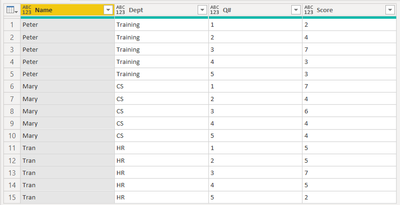
I believe there are other ways to do it. Paste the code in Advanced Editor, see the output
let
Source = Table.FromRows(
Json.Document(
Binary.Decompress(
Binary.FromText(
"i45W8kvMTVXSQaFidaKVAlJLUouAAr6JRZVAKqQoMQ8s7pJaUALkI1MgYaB8Zl5mXjpQzDkYSHgEgYUDDYFsGAESMAIyzYHYFCIN4sIIkIAJkGmCkDYGyUAJkABIpxnYBLA0SCWMAAkYo+o2BclACWRpoFWxAA==",
BinaryEncoding.Base64
),
Compression.Deflate
)
),
let
_t = ((type nullable text) meta [Serialized.Text = true])
in
type table [#"Field 1" = _t, #"Field 2" = _t, #"Field 3" = _t]
),
#"Changed Type" = Table.TransformColumnTypes(
Source,
{{"Field 1", type text}, {"Field 2", type text}, {"Field 3", type text}}
),
#"Transposed Table" = Table.Transpose(#"Changed Type"),
#"Grouped Rows" = Table.Group(
#"Transposed Table",
{"Column1", "Column2", "Column3", "Column4"},
{{"allrows", each Table.Skip(Table.Transpose(_), 4), type table}}
),
#"Added Custom" = Table.AddColumn(
#"Grouped Rows",
"Custom",
each [
a = Table.AddIndexColumn([allrows], "Index", 0, 1, Int64.Type),
b = Table.AddColumn(a, "Custom", each Number.RoundDown([Index] / 2)),
c = Table.Group(b, {"Custom"}, {{"Q", each Table.Transpose(Table.FromList(_[Column1]))}})
][c]
),
#"Expanded Custom" = Table.ExpandTableColumn(#"Added Custom", "Custom", {"Q"}, {"Q"}),
#"Expanded Q" = Table.ExpandTableColumn(
#"Expanded Custom",
"Q",
{"Column1", "Column2"},
{"Column1.1", "Column2.1"}
),
#"Added Custom1" = Table.AddColumn(#"Expanded Q", "Custom", each Text.At([Column1.1], 1)),
#"Renamed Columns" = Table.RenameColumns(
#"Added Custom1",
{{"Column2", "Name"}, {"Column4", "Dept"}, {"Custom", "Q#"}, {"Column2.1", "Score"}}
),
#"Removed Other Columns" = Table.SelectColumns(
#"Renamed Columns",
{"Name", "Dept", "Q#", "Score"}
)
in
#"Removed Other Columns"
Join us in Barcelona for FabCon and SQLCon, the Fabric, Power BI, SQL, and AI community event. Save €200 with code FABCMTY200.
If you love stickers, then you will definitely want to check out our community sticker challenge, Barcelona edition!
Check out the July 2026 Power BI update to learn about new features.