cancel
Showing results for 
Search instead for 
Did you mean: 

Vote for your favorite vizzies from the Power BI Dataviz World Championship submissions. Vote now!

Reply
Anonymous
Not applicable

PMT Function in Power Query

PMT function exists in DAX but I need to do this calculation in Power Query. 

Does anyone have a workaround for this?

4 REPLIES 4
edhans
Community Champion
Community Champion

You can either do the math manually, or write a custom function. Here is a function that does it:

(PV, r, n) =>
let
    Payment = (r * PV) / (1 - Number.Power(1 + r, -n))
in
    Payment
  • Create a new blank query.
  • Open the Advanced Editor
  • Erase everything.
  • Paste in the above formula
  • Rename the query (probably Query1) to fnPMT (or whatever you want to call it, I just like custom functions to start with fn*

Now just use it like normal.

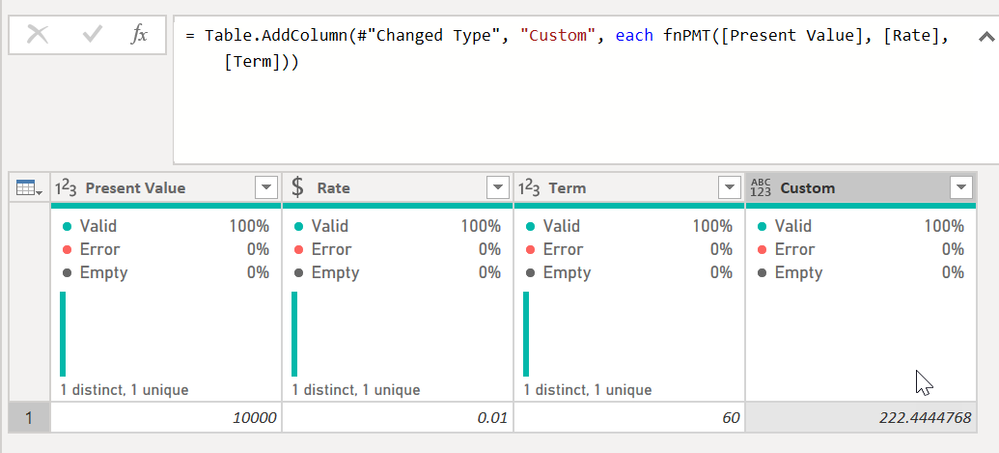
I added a custom column and typed = fnPMT([Present Value], [Rate], [Term]) and it did the work.

edhans_0-1620179900842.png

I used the base formula from here @Anonymous - you may need to divide your rate by the periods in a year depending on how your data is laid out. In that case it would be fnPMT([Present Value], [Rate]/12, [Term])


Did I answer your question? Mark my post as a solution!
Did my answers help arrive at a solution? Give it a kudos by clicking the Thumbs Up!

DAX is for Analysis. Power Query is for Data Modeling


Proud to be a Super User!

MCSA: BI Reporting
Anonymous
Not applicable

The difference between DAX's PMT calculation and this is that this does not consider Future VAlue (FV) in the formula. 

edhans
Community Champion
Community Champion

What this helpful @Anonymous ? Any questions?


Did I answer your question? Mark my post as a solution!
Did my answers help arrive at a solution? Give it a kudos by clicking the Thumbs Up!

DAX is for Analysis. Power Query is for Data Modeling


Proud to be a Super User!

MCSA: BI Reporting
Greg_Deckler
Community Champion
Community Champion

@Anonymous You can find the formula for PMT here: P-Q Excel to DAX Translation - Microsoft Power BI Community Should be able to translate it to M since it is all base arithmatic.


Follow on LinkedIn
@ me in replies or I'll lose your thread!!!
Instead of a Kudo, please vote for this idea
Become an expert!: Enterprise DNA
External Tools: MSHGQM
YouTube Channel!: Microsoft Hates Greg
Latest book!:
DAX For Humans

DAX is easy, CALCULATE makes DAX hard...

Helpful resources

Announcements
Power BI DataViz World Championships

Power BI Dataviz World Championships

Vote for your favorite vizzies from the Power BI World Championship submissions!

Sticker Challenge 2026 Carousel

Join our Community Sticker Challenge 2026

If you love stickers, then you will definitely want to check out our Community Sticker Challenge!

January Power BI Update Carousel

Power BI Monthly Update - January 2026

Check out the January 2026 Power BI update to learn about new features.

FabCon Atlanta 2026 carousel

FabCon Atlanta 2026

Join us at FabCon Atlanta, March 16-20, for the ultimate Fabric, Power BI, AI and SQL community-led event. Save $200 with code FABCOMM.