Don't miss your chance to take the Fabric Data Engineer (DP-600) exam for FREE! Find out how by attending the DP-600 session on April 23rd (pacific time), live or on-demand.
Learn moreNext up in the FabCon + SQLCon recap series: The roadmap for Microsoft SQL and Maximizing Developer experiences in Fabric. All sessions are available on-demand after the live show. Register now
PMT function exists in DAX but I need to do this calculation in Power Query.
Does anyone have a workaround for this?
You can either do the math manually, or write a custom function. Here is a function that does it:
(PV, r, n) =>
let
Payment = (r * PV) / (1 - Number.Power(1 + r, -n))
in
Payment
Now just use it like normal.
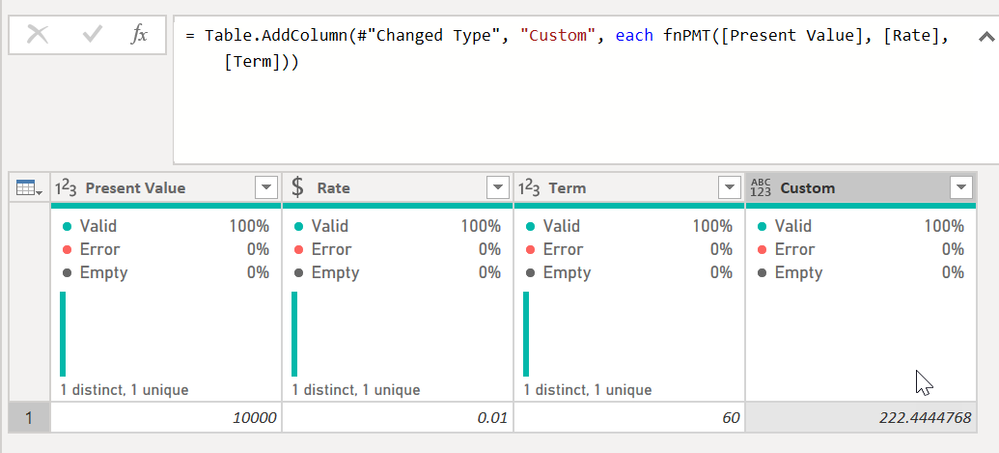
I added a custom column and typed = fnPMT([Present Value], [Rate], [Term]) and it did the work.
I used the base formula from here @Anonymous - you may need to divide your rate by the periods in a year depending on how your data is laid out. In that case it would be fnPMT([Present Value], [Rate]/12, [Term])
DAX is for Analysis. Power Query is for Data Modeling
Proud to be a Super User!
MCSA: BI ReportingThe difference between DAX's PMT calculation and this is that this does not consider Future VAlue (FV) in the formula.
What this helpful @Anonymous ? Any questions?
DAX is for Analysis. Power Query is for Data Modeling
Proud to be a Super User!
MCSA: BI Reporting@Anonymous You can find the formula for PMT here: P-Q Excel to DAX Translation - Microsoft Power BI Community Should be able to translate it to M since it is all base arithmatic.
If you have recently started exploring Fabric, we'd love to hear how it's going. Your feedback can help with product improvements.
A new Power BI DataViz World Championship is coming this June! Don't miss out on submitting your entry.
Experience the highlights from FabCon & SQLCon, available live and on-demand starting April 14th.
| User | Count |
|---|---|
| 5 | |
| 3 | |
| 3 | |
| 3 | |
| 2 |
| User | Count |
|---|---|
| 7 | |
| 5 | |
| 5 | |
| 5 | |
| 4 |