Get certified for free when you join Fabric Data Days 2026 and dive into Fabric, Power BI, SQL, AI, and other essential data skills.
Join nowJuly 28 - August 9 | Final Round of the Power BI Dataviz World Championships. This is your chance. Learn more
PMT function exists in DAX but I need to do this calculation in Power Query.
Does anyone have a workaround for this?
You can either do the math manually, or write a custom function. Here is a function that does it:
(PV, r, n) =>
let
Payment = (r * PV) / (1 - Number.Power(1 + r, -n))
in
Payment
Now just use it like normal.
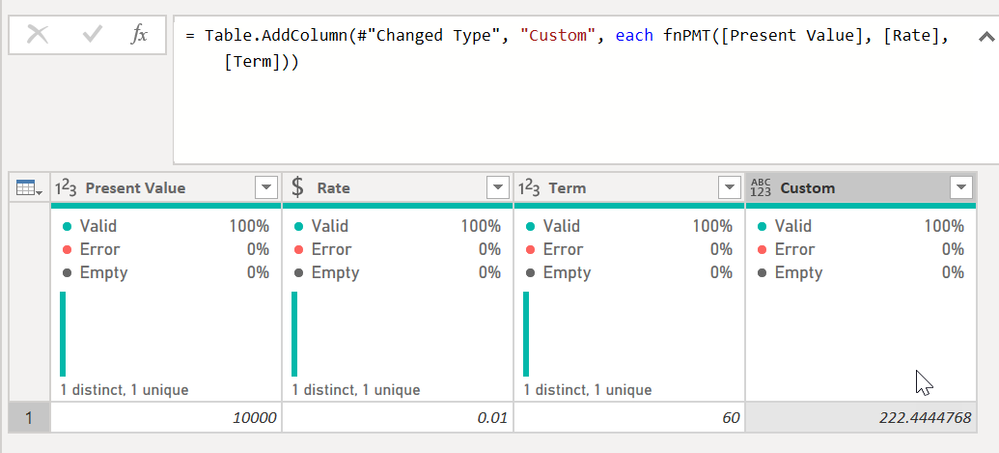
I added a custom column and typed = fnPMT([Present Value], [Rate], [Term]) and it did the work.
I used the base formula from here @Anonymous - you may need to divide your rate by the periods in a year depending on how your data is laid out. In that case it would be fnPMT([Present Value], [Rate]/12, [Term])
DAX is for Analysis. Power Query is for Data Modeling
Proud to be a Super User!
MCSA: BI ReportingThe difference between DAX's PMT calculation and this is that this does not consider Future VAlue (FV) in the formula.
What this helpful @Anonymous ? Any questions?
DAX is for Analysis. Power Query is for Data Modeling
Proud to be a Super User!
MCSA: BI Reporting@Anonymous You can find the formula for PMT here: P-Q Excel to DAX Translation - Microsoft Power BI Community Should be able to translate it to M since it is all base arithmatic.
Join us in Barcelona for FabCon and SQLCon, the Fabric, Power BI, SQL, and AI community event. Save €200 with code FABCMTY200.
If you love stickers, then you will definitely want to check out our community sticker challenge, Barcelona edition!
Check out the July 2026 Power BI update to learn about new features.