cancel
Showing results for 
Search instead for 
Did you mean: 

Try your skills in the Power BI Dataviz World Championship! Round one ends June 26. Join now

Reply
Ayupchap
Helper III
Helper III

ODBC Connection error - 07006

HI all


So I am super new at this kind of thing but very excited to get this to work and wonder if someone would be kind enough to help me.  This is the first time I have ever tried to do anythign like this so I am a super novice.


I successfully created a connection with ODBC to a data source I use here at my work (a primary school) which is so exciting as I want to pull it into PowerBI  The source I'm pulling from is called PowerSchool a student SIS.  I am trying to make this work with the ODBC connector in PowerBI which it does, I can see all the tables listed but unfortunately though when I click on any table I get this error: 
DataSource.Error: ODBC: ERROR [07006] [Oracle][ODBC]Restricted data type attribute violation. 
Details: 
DataSourceKind=Odbc 
DataSourcePath=dsn=PowerSchool WORKS 
OdbcErrors=Table 

This weirdly works in MS Access


What can I do about this?  Any help so appreciated!!!

1 ACCEPTED SOLUTION
Anonymous
Not applicable

@Ayupchap,

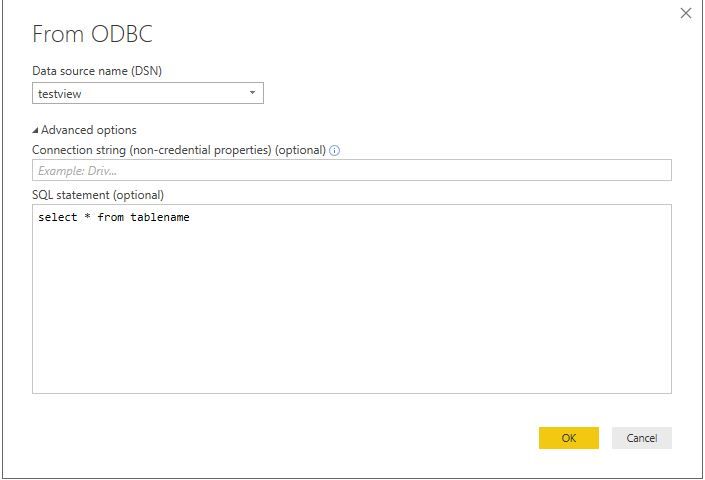
Do you use the latest version of Power BI Desktop(2.51.4885.581)? And are you able to import the data into Power BI Desktop with SQL statement?

1.JPG


Regards,
Lydia

View solution in original post

4 REPLIES 4
Anonymous
Not applicable

Other way of doing it:

@Anonymous

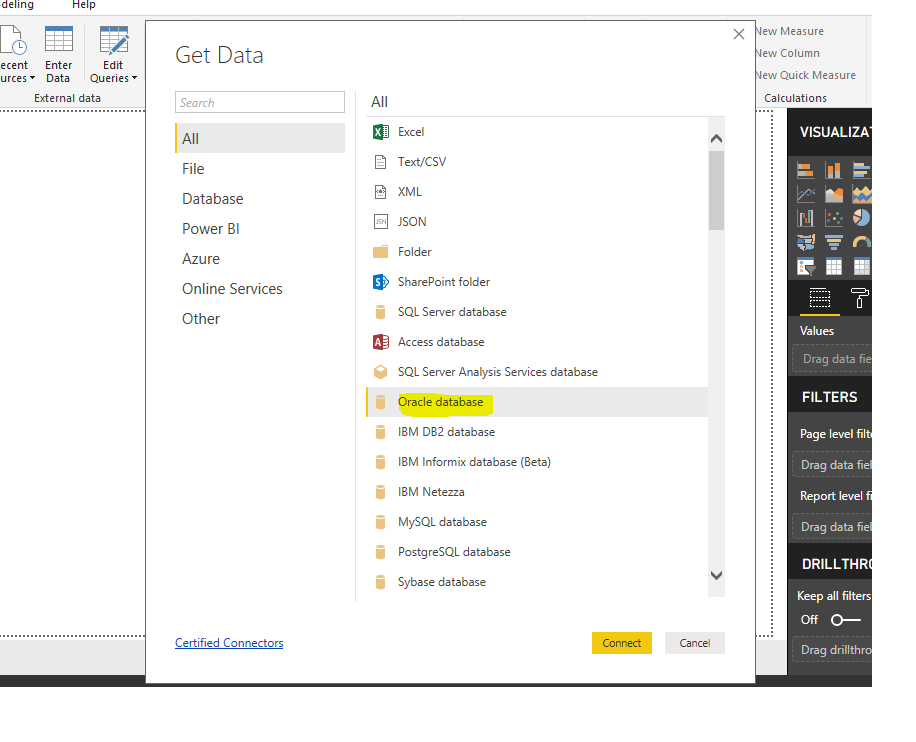
This can be done by using the TNS name in the Oracle Database Native Driver in Power BI.Oracle_sol_1.png


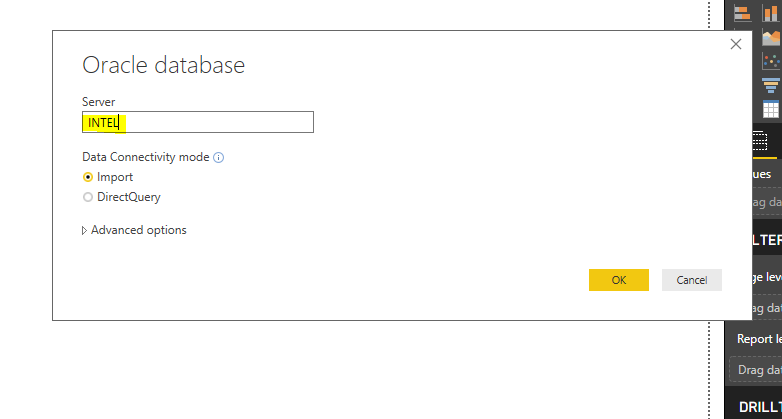
Use TNS Service Name in the place of Server Name. (TNS Sevice Name provided in creation of ODBC driver and DSN )


This helps in successfull connection to the Oracle Database.


oracle_solution_2.PNG

 Hope it works well for you too...

Anonymous
Not applicable

@Ayupchap,

Do you use the latest version of Power BI Desktop(2.51.4885.581)? And are you able to import the data into Power BI Desktop with SQL statement?

1.JPG


Regards,
Lydia

Ahh ha ha thats it!  Thank you so so much.  I didn't realize you could do that! I have been able to do what I need.  Amazing!

Anonymous
Not applicable

I have the same issue. Using the sql string works as well, but this isn't very conducive to connecting to multiple tables. How do we get this corrected so that browsing the hierarchy works?

Helpful resources

Announcements
Fabric Data Days is here Carousel

Fabric Data Days 2026

Don't miss out on Data Days, June 15 through August 7. Learn Fabric, Power BI, SQL, AI and more.

Power BI DataViz World Championships carousel

Power BI DataViz World Championships - June 2026

A new Power BI DataViz World Championship is coming this June! Don't miss out on submitting your entry.