This is best Fabric, Power BI, SQL and AI community event. How do we know? The last event sold out! Save €200 with code FABCMTY200.
Register nowA new Data Days event is coming soon! This time we’re going bigger than ever. Fabric, Power BI, SQL, AI and more. Don't miss out.
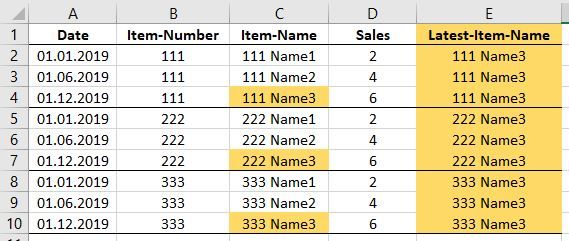
Hi, I have a table with 4 columns: Date, Item-Number, Item-Name, Sales. The Item-Name (of the same Item-Number) changes over time.
-> I want to add a column with Power Query M which adds the latest Item-Name for each row, as below. Thanks your help! Mike
Solved! Go to Solution.
Hi @mike-germany ,
You could try below M code to see whether it works or not
let
Source = Table.FromRows(Json.Document(Binary.Decompress(Binary.FromText("i45WMjIwMtA31DdU0lEyNISSCn6JuakgtpFSrA5ciRmGEiMg2wRZiaERhhpjINsMRQ3IXCMjCInbJlQl2G1CVYPVJmNjYwiJ2yZUJdhtQlUDtSkWAA==", BinaryEncoding.Base64), Compression.Deflate)), let _t = ((type text) meta [Serialized.Text = true]) in type table [Date = _t, #"Item-Number" = _t, #"Item-Name" = _t, Sales = _t]),
#"Changed Type" = Table.TransformColumnTypes(Source,{{"Date", type date}, {"Item-Number", Int64.Type}, {"Item-Name", type text}, {"Sales", Int64.Type}}),
#"Grouped Rows" = Table.Group(#"Changed Type", {"Item-Number"}, {{"max", each List.Max([Date]), type date}, {"all", each _, type table [Date=date, #"Item-Number"=number, #"Item-Name"=text, Sales=number]}}),
#"Expanded all" = Table.ExpandTableColumn(#"Grouped Rows", "all", {"Date", "Item-Name", "Sales"}, {"Date", "Item-Name", "Sales"}),
#"Added Custom" = Table.AddColumn(#"Expanded all", "Custom", each if [max]=[Date] then [#"Item-Name"] else null),
#"Filled Up" = Table.FillUp(#"Added Custom",{"Custom"}),
#"Removed Columns" = Table.RemoveColumns(#"Filled Up",{"max"})
in
#"Removed Columns"
Best Regards,
Zoe Zhi
If this post helps, then please consider Accept it as the solution to help the other members find it more quickly.
I could solve it with a reference table, group by funtion, and merge the tables again afterwards. However I'd still be interested if there isn't a more elegant solution within the original table.
Hi @mike-germany ,
You could try below M code to see whether it works or not
let
Source = Table.FromRows(Json.Document(Binary.Decompress(Binary.FromText("i45WMjIwMtA31DdU0lEyNISSCn6JuakgtpFSrA5ciRmGEiMg2wRZiaERhhpjINsMRQ3IXCMjCInbJlQl2G1CVYPVJmNjYwiJ2yZUJdhtQlUDtSkWAA==", BinaryEncoding.Base64), Compression.Deflate)), let _t = ((type text) meta [Serialized.Text = true]) in type table [Date = _t, #"Item-Number" = _t, #"Item-Name" = _t, Sales = _t]),
#"Changed Type" = Table.TransformColumnTypes(Source,{{"Date", type date}, {"Item-Number", Int64.Type}, {"Item-Name", type text}, {"Sales", Int64.Type}}),
#"Grouped Rows" = Table.Group(#"Changed Type", {"Item-Number"}, {{"max", each List.Max([Date]), type date}, {"all", each _, type table [Date=date, #"Item-Number"=number, #"Item-Name"=text, Sales=number]}}),
#"Expanded all" = Table.ExpandTableColumn(#"Grouped Rows", "all", {"Date", "Item-Name", "Sales"}, {"Date", "Item-Name", "Sales"}),
#"Added Custom" = Table.AddColumn(#"Expanded all", "Custom", each if [max]=[Date] then [#"Item-Name"] else null),
#"Filled Up" = Table.FillUp(#"Added Custom",{"Custom"}),
#"Removed Columns" = Table.RemoveColumns(#"Filled Up",{"max"})
in
#"Removed Columns"
Best Regards,
Zoe Zhi
If this post helps, then please consider Accept it as the solution to help the other members find it more quickly.
Check out the May 2026 Power BI update to learn about new features.
Sign up to receive a private message when registration opens and key events begin.
If you have recently started exploring Fabric, we'd love to hear how it's going. Your feedback can help with product improvements.
| User | Count |
|---|---|
| 4 | |
| 3 | |
| 2 | |
| 2 | |
| 1 |