Don't miss your chance to take the Fabric Data Engineer (DP-700) exam on us!
Learn moreWe've captured the moments from FabCon & SQLCon that everyone is talking about, and we are bringing them to the community, live and on-demand. Starts on April 14th. Register now
Hi all,
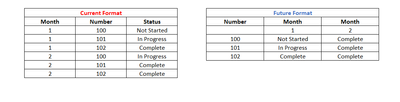
I have data pulling in a query in the "Current Format" and want to adjust the query to pull it in like the "Future Format".
Essentially want to use this to track status by month over a long period of time. And with there being tens of thousands of "Numbers" I get too much data in the current format to pull into one spreadsheet.
Thanks for all your help!
Solved! Go to Solution.
NewStep=let a=Table.TransformColumns(CurrentFormat,{"Month",Text.From}) in Table.Pivot(a,List.Distinct(a[Month]),"Month","Status",Text.Combine)
Edit: NVM I figured it out. Thank you!
Thanks for your response. I'm getting an error from the List.Distinct function.
List.Distinct(a[Month])
Expression.Error: The column 'Month' of the table wasn't found.
Details:
Month
If you have recently started exploring Fabric, we'd love to hear how it's going. Your feedback can help with product improvements.
A new Power BI DataViz World Championship is coming this June! Don't miss out on submitting your entry.
Share feedback directly with Fabric product managers, participate in targeted research studies and influence the Fabric roadmap.
| User | Count |
|---|---|
| 5 | |
| 3 | |
| 3 | |
| 2 | |
| 2 |
| User | Count |
|---|---|
| 9 | |
| 8 | |
| 7 | |
| 5 | |
| 5 |