Join us at FabCon Atlanta from March 16 - 20, 2026, for the ultimate Fabric, Power BI, AI and SQL community-led event. Save $200 with code FABCOMM.
Register now!Vote for your favorite vizzies from the Power BI Dataviz World Championship submissions. Vote now!
Hi all,
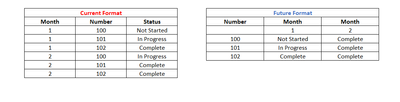
I have data pulling in a query in the "Current Format" and want to adjust the query to pull it in like the "Future Format".
Essentially want to use this to track status by month over a long period of time. And with there being tens of thousands of "Numbers" I get too much data in the current format to pull into one spreadsheet.
Thanks for all your help!
Solved! Go to Solution.
NewStep=let a=Table.TransformColumns(CurrentFormat,{"Month",Text.From}) in Table.Pivot(a,List.Distinct(a[Month]),"Month","Status",Text.Combine)
Edit: NVM I figured it out. Thank you!
Thanks for your response. I'm getting an error from the List.Distinct function.
List.Distinct(a[Month])
Expression.Error: The column 'Month' of the table wasn't found.
Details:
Month
The Power BI Data Visualization World Championships is back! It's time to submit your entry.
If you love stickers, then you will definitely want to check out our Community Sticker Challenge!
Check out the January 2026 Power BI update to learn about new features.