cancel
Showing results for 
Search instead for 
Did you mean: 

July 28 - August 9 | Final Round of the Power BI Dataviz World Championships. This is your chance. Learn more

Reply
lj910628
Regular Visitor

Mixed Date and Text Extract

I have the following mixed column containing status and date formatted as text. The date is entered when complete i.e. status is complete.

lj910628_0-1623254922338.png

I would like 2 additional columns, 1 to assign a status (In Work, Pending, Complete) and another to extract the date.

Can anyone help? DATEVALUE doesn't seem to play.

1 ACCEPTED SOLUTION
mahoneypat
Microsoft Employee
Microsoft Employee

Here's one way to do it in the query editor.  To see how it works, just create a blank query, open the Advanced Editor and replace the text there with the M code below.


let
    Source = Table.FromRows(Json.Document(Binary.Decompress(Binary.FromText("i45W8sxTCM8vylaK1YlWCkjNS8nMSwezDUz1Dcz1jQyMDCFcE31DYwQXWZehgb6hIUjKQCk2FgA=", BinaryEncoding.Base64), Compression.Deflate)), let _t = ((type nullable text) meta [Serialized.Text = true]) in type table [#"PIA Form" = _t]),
    #"Added Custom" = Table.AddColumn(Source, "Status", each if Text.Contains([PIA Form], "/") then "Complete" else [PIA Form], type text),
    #"Added Custom1" = Table.AddColumn(#"Added Custom", "CompletionDate", each if [Status] = "Complete" then Date.From([PIA Form]) else null, type date)
in
    #"Added Custom1"


Pat


Did I answer your question? Mark my post as a solution! Kudos are also appreciated!

To learn more about Power BI, follow me on Twitter or subscribe on YouTube.


@mahoneypa HoosierBI on YouTube


View solution in original post

3 REPLIES 3
Anonymous
Not applicable

@lj910628 

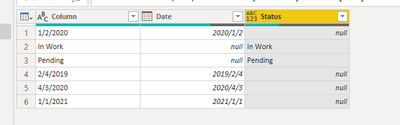
Check the example pbix for detail:

V-pazhen-msft_0-1623393786880.png

let
    Source = Table.FromRows(Json.Document(Binary.Decompress(Binary.FromText("i45WMtQ30jcyMDJQitWJVvLMUwjPL8oGswNS81Iy89LBbCN9E6AiQ0swx0TfGKHDUN8QxDFUio0FAA==", BinaryEncoding.Base64), Compression.Deflate)), let _t = ((type nullable text) meta [Serialized.Text = true]) in type table [Column = _t]),
    #"Duplicated Column" = Table.DuplicateColumn(Source, "Column", "Column - Copy"),
    #"Changed Type" = Table.TransformColumnTypes(#"Duplicated Column",{{"Column - Copy", type date}}),
    #"Renamed Columns" = Table.RenameColumns(#"Changed Type",{{"Column - Copy", "Date"}}),
    #"Replaced Errors" = Table.ReplaceErrorValues(#"Renamed Columns", {{"Date", null}}),
    #"Added Conditional Column" = Table.AddColumn(#"Replaced Errors", "Status", each if [Date] = null then [Column] else null)
in
    #"Added Conditional Column"


Paul Zheng _ Community Support Team
If this post helps, please Accept it as the solution to help the other members find it more quickly.

mahoneypat
Microsoft Employee
Microsoft Employee

Here's one way to do it in the query editor.  To see how it works, just create a blank query, open the Advanced Editor and replace the text there with the M code below.


let
    Source = Table.FromRows(Json.Document(Binary.Decompress(Binary.FromText("i45W8sxTCM8vylaK1YlWCkjNS8nMSwezDUz1Dcz1jQyMDCFcE31DYwQXWZehgb6hIUjKQCk2FgA=", BinaryEncoding.Base64), Compression.Deflate)), let _t = ((type nullable text) meta [Serialized.Text = true]) in type table [#"PIA Form" = _t]),
    #"Added Custom" = Table.AddColumn(Source, "Status", each if Text.Contains([PIA Form], "/") then "Complete" else [PIA Form], type text),
    #"Added Custom1" = Table.AddColumn(#"Added Custom", "CompletionDate", each if [Status] = "Complete" then Date.From([PIA Form]) else null, type date)
in
    #"Added Custom1"


Pat


Did I answer your question? Mark my post as a solution! Kudos are also appreciated!

To learn more about Power BI, follow me on Twitter or subscribe on YouTube.


@mahoneypa HoosierBI on YouTube


Anonymous
Not applicable

Do you want dates down the whole column?  I'm having difficulty envisioning what your final table should look like.

--Nate

Helpful resources

Announcements
FabCon and SQLCon Barcelona 2026

FabCon & SQLCon – Barcelona 2026

Join us in Barcelona for FabCon and SQLCon, the Fabric, Power BI, SQL, and AI community event. Save €200 with code FABCMTY200.

Fabric Community Sticker Design Challenge Barcelona Carousel

Fabric Community Sticker Challenge - Barcelona 2026

If you love stickers, then you will definitely want to check out our community sticker challenge, Barcelona edition!

July Power BI Update Carousel

Power BI Monthly Update - July 2026

Check out the July 2026 Power BI update to learn about new features.

Power BI DataViz World Championships carousel

Power BI DataViz World Championships - June 2026

A new Power BI DataViz World Championship is coming this June! Don't miss out on submitting your entry.