cancel
Showing results for 
Search instead for 
Did you mean: 

We've captured the moments from FabCon & SQLCon that everyone is talking about, and we are bringing them to the community, live and on-demand. Starts on April 14th. Register now

Reply
Anonymous
Not applicable

Merge 2 rows with text condition

Hi everyone,


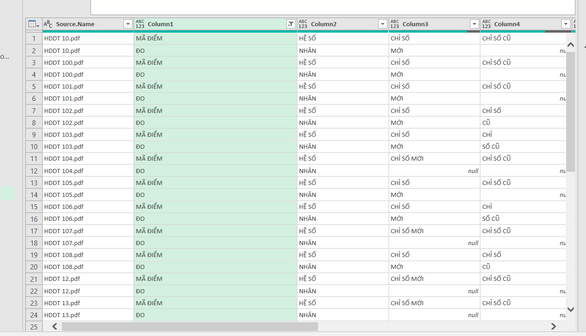
I'm currently doing this data transferring for invoice. What I want is for each of the invoice PDF, the row "MÃ ĐIỂM" and "ĐO", would combine together. Anyone have any idea ? Thank you a lot for your support ! 

haule1999_0-1678017148235.png


5 REPLIES 5
6677028
Frequent Visitor

how do you want to combine "mã điểm" and "đo" columns. Any other relevant data? Better you update the image you want.

Anonymous
Not applicable

Hi 6677028,

haule1999_0-1678078914186.png

This is the column that I expected it to have. Thank you a lot !

6677028
Frequent Visitor

You update the data file,  I made for you. Viet Nam


Anonymous
Not applicable

You can check. It is correct  or not correct 

let

    Source = Excel.CurrentWorkbook(){[Name="Send_to_community"]}[Content],

    #"Filtered Rows" = Table.SelectRows(Source, each ([Column1] = "MÃ ĐIỂM" or [Column1] = "ĐO")),

    #"Added Index" = Table.AddIndexColumn(#"Filtered Rows", "Index", 0, 1, Int64.Type),

    #"Added Index1" = Table.AddIndexColumn(#"Added Index", "Index.1", 1, 1, Int64.Type),

    #"Merged Queries" = Table.NestedJoin(#"Added Index1", {"Index"}, #"Added Index1", {"Index.1"}, "Added Index1", JoinKind.FullOuter),

    #"Expanded Added Index1" = Table.ExpandTableColumn(#"Merged Queries", "Added Index1", {"Column1"}, {"Added Index1.Column1"}),

    #"Reordered Columns" = Table.ReorderColumns(#"Expanded Added Index1",{"Source.Name", "Column1", "Added Index1.Column1", "Column2", "Column3", "Column4", "Column5", "Column6", "Column7", "Column8", "Index", "Index.1"}),

    #"Sorted Rows" = Table.Sort(#"Reordered Columns",{{"Source.Name", Order.Ascending}, {"Column1", Order.Ascending}}),

    #"Added Custom" = Table.AddColumn(#"Sorted Rows", "Custom", each if [Added Index1.Column1]= null then [Column1]&" "&"ĐO" else if [Column1]="ĐO" then [Added Index1.Column1]&" "&[Column1] else [Column1]&" "&[Added Index1.Column1]),

    #"Filtered Rows1" = Table.SelectRows(#"Added Custom", each ([Source.Name] <> null)),

    #"Removed Columns" = Table.RemoveColumns(#"Filtered Rows1",{"Column1", "Added Index1.Column1"}),

    #"Reordered Columns1" = Table.ReorderColumns(#"Removed Columns",{"Source.Name", "Custom", "Column2", "Column3", "Column4", "Column5", "Column6", "Column7", "Column8", "Index", "Index.1"})

in

    #"Reordered Columns1"

Helpful resources

Announcements
New to Fabric survey Carousel

New to Fabric Survey

If you have recently started exploring Fabric, we'd love to hear how it's going. Your feedback can help with product improvements.

Power BI DataViz World Championships carousel

Power BI DataViz World Championships - June 2026

A new Power BI DataViz World Championship is coming this June! Don't miss out on submitting your entry.

Join our Fabric User Panel

Join our Fabric User Panel

Share feedback directly with Fabric product managers, participate in targeted research studies and influence the Fabric roadmap.

March Power BI Update Carousel

Power BI Community Update - March 2026

Check out the March 2026 Power BI update to learn about new features.