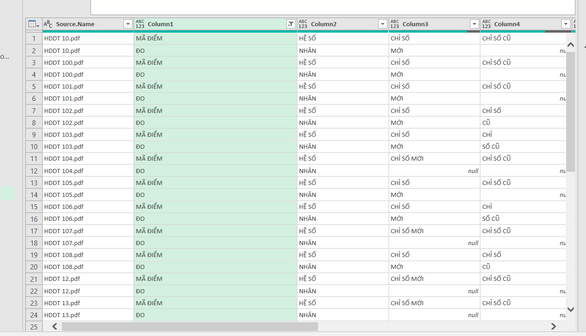
You can check. It is correct or not correct
let
Source = Excel.CurrentWorkbook(){[Name="Send_to_community"]}[Content],
#"Filtered Rows" = Table.SelectRows(Source, each ([Column1] = "MÃ ĐIỂM" or [Column1] = "ĐO")),
#"Added Index" = Table.AddIndexColumn(#"Filtered Rows", "Index", 0, 1, Int64.Type),
#"Added Index1" = Table.AddIndexColumn(#"Added Index", "Index.1", 1, 1, Int64.Type),
#"Merged Queries" = Table.NestedJoin(#"Added Index1", {"Index"}, #"Added Index1", {"Index.1"}, "Added Index1", JoinKind.FullOuter),
#"Expanded Added Index1" = Table.ExpandTableColumn(#"Merged Queries", "Added Index1", {"Column1"}, {"Added Index1.Column1"}),
#"Reordered Columns" = Table.ReorderColumns(#"Expanded Added Index1",{"Source.Name", "Column1", "Added Index1.Column1", "Column2", "Column3", "Column4", "Column5", "Column6", "Column7", "Column8", "Index", "Index.1"}),
#"Sorted Rows" = Table.Sort(#"Reordered Columns",{{"Source.Name", Order.Ascending}, {"Column1", Order.Ascending}}),
#"Added Custom" = Table.AddColumn(#"Sorted Rows", "Custom", each if [Added Index1.Column1]= null then [Column1]&" "&"ĐO" else if [Column1]="ĐO" then [Added Index1.Column1]&" "&[Column1] else [Column1]&" "&[Added Index1.Column1]),
#"Filtered Rows1" = Table.SelectRows(#"Added Custom", each ([Source.Name] <> null)),
#"Removed Columns" = Table.RemoveColumns(#"Filtered Rows1",{"Column1", "Added Index1.Column1"}),
#"Reordered Columns1" = Table.ReorderColumns(#"Removed Columns",{"Source.Name", "Custom", "Column2", "Column3", "Column4", "Column5", "Column6", "Column7", "Column8", "Index", "Index.1"})
in
#"Reordered Columns1"