cancel
Showing results for 
Search instead for 
Did you mean: 

July 7 - July 17 | Round 2 of the Power BI Dataviz World Championships. Don't miss your chance! Learn more

Reply
KenMann
Regular Visitor

Mark table as date table issue

Hi guys,


In my Fabric Dataset, I have a dimDate table which coming from a csv file, and after looking at the content, it does not have a column with Date type. 


As I'm using this dataset in Power BI Desktop, so I tried to solve this by create new column to table by using function DATE(year, month, day), give the column name "Date"


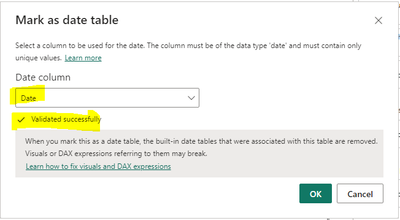
So when I have this new column "Date", I think I can mark my table as date table. Although it is validated sucessfully I received this error ->

KenMann_0-1701455567690.png

and this after click "Ok"

KenMann_1-1701455837495.png


After googling, found this "old" thread in this forum as well -> https://community.fabric.microsoft.com/t5/Desktop/Not-able-to-click-OK-in-Mark-as-date-table-dialogu...

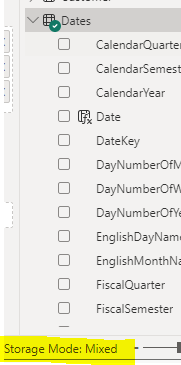
which mentioned that we need to switch the storage mode to Dual. First of all, am I right to say this is mean Mixed mode ?


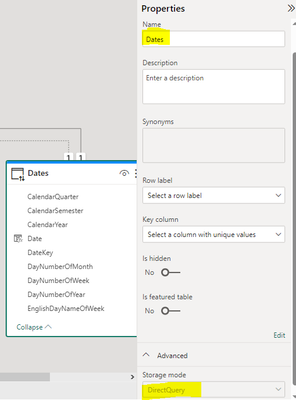
But actually my model already Mixed, although the Date table it self is "DirectQuery" and it looks like I cannot change it.

KenMann_2-1701455894170.png  

KenMann_3-1701455996937.png


May I know how to solve this ?


Thanks.


1 ACCEPTED SOLUTION
Anonymous
Not applicable

Hi @KenMann 

The calculated column is based on other columns, so it cannnot be set as a primary key, but you can refer to the following soution.

Create a calcualted table, use the date calculated column you have created.

e.g

Table=Summarize('Dates',[Date])

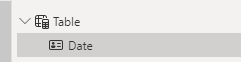
Then you can set this [Date] column of the new table as a Date table, it can work. and you can refer to the following attachments.

vxinruzhumsft_0-1701930767759.png

Best Regards!

Yolo Zhu

If this post helps, then please consider Accept it as the solution to help the other members find it more quickly.

View solution in original post

2 REPLIES 2
Anonymous
Not applicable

Hi @KenMann 

The calculated column is based on other columns, so it cannnot be set as a primary key, but you can refer to the following soution.

Create a calcualted table, use the date calculated column you have created.

e.g

Table=Summarize('Dates',[Date])

Then you can set this [Date] column of the new table as a Date table, it can work. and you can refer to the following attachments.

vxinruzhumsft_0-1701930767759.png

Best Regards!

Yolo Zhu

If this post helps, then please consider Accept it as the solution to help the other members find it more quickly.

Syndicate_Admin
Administrator
Administrator

Create your date column in Power Query, not in DAX.

Helpful resources

Announcements
FabCon and SQLCon Barcelona 2026

FabCon & SQLCon – Barcelona 2026

Join us in Barcelona for FabCon and SQLCon, the Fabric, Power BI, SQL, and AI community event. Save €200 with code FABCMTY200.

60 days of Data Days Carousel

Data Days 2026

Join Data Days 2026: 60 days of free live/on-demand sessions, challenges, study groups, and certification opportunities.

Power BI DataViz World Championships carousel

Power BI DataViz World Championships - June 2026

A new Power BI DataViz World Championship is coming this June! Don't miss out on submitting your entry.

Top Solution Authors