Join us at FabCon Atlanta from March 16 - 20, 2026, for the ultimate Fabric, Power BI, AI and SQL community-led event. Save $200 with code FABCOMM.
Register now!The Power BI Data Visualization World Championships is back! Get ahead of the game and start preparing now! Learn more
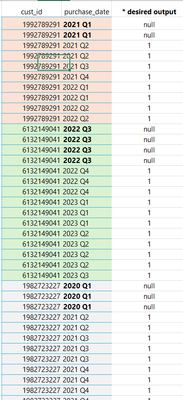
i have customer ID and I have dates that repeat. i created a function that returns the 1st item in list and says, if item = item from list then null else 1... BUT, how do I use this on each set of Cust_ID? how do I loop each cust_id group and apply this logic?
please see screenshot, desired output is 3rd Col.
here is code to get 1st item in list and compare to dates. Just not sure how to loop each cust_id group to apply this to each cust-id thanks
= Table.AddColumn(#"Reordered Columns", "try_index", each if [Quarter Received_Date] = List.First( List.Distinct(#"Reordered Columns"[Quarter Received_Date])) then null else 1)
Solved! Go to Solution.
Group By first and then create the custom column in the grouped tables.
let
Source = Table.FromRows(Json.Document(Binary.Decompress(Binary.FromText("i45WMlTSUTIyMDJUCDRUitWB840UAo3Q+MZgvhGavBFOeROl2FgA", BinaryEncoding.Base64), Compression.Deflate)), let _t = ((type nullable text) meta [Serialized.Text = true]) in type table [cust_id = _t, purchase_date = _t]),
#"Changed Type" = Table.TransformColumnTypes(Source,{{"cust_id", Int64.Type}, {"purchase_date", type text}}),
#"Grouped Rows" = Table.Group(
#"Changed Type",
{"cust_id"},
{
"index",
each Table.AddColumn(
_,
"index",
(x) => if x[purchase_date] = List.First( List.Distinct(_[purchase_date])) then null else 1)
}
)
in
#"Grouped Rows"
Group By first and then create the custom column in the grouped tables.
let
Source = Table.FromRows(Json.Document(Binary.Decompress(Binary.FromText("i45WMlTSUTIyMDJUCDRUitWB840UAo3Q+MZgvhGavBFOeROl2FgA", BinaryEncoding.Base64), Compression.Deflate)), let _t = ((type nullable text) meta [Serialized.Text = true]) in type table [cust_id = _t, purchase_date = _t]),
#"Changed Type" = Table.TransformColumnTypes(Source,{{"cust_id", Int64.Type}, {"purchase_date", type text}}),
#"Grouped Rows" = Table.Group(
#"Changed Type",
{"cust_id"},
{
"index",
each Table.AddColumn(
_,
"index",
(x) => if x[purchase_date] = List.First( List.Distinct(_[purchase_date])) then null else 1)
}
)
in
#"Grouped Rows"
The Power BI Data Visualization World Championships is back! Get ahead of the game and start preparing now!