We've captured the moments from FabCon & SQLCon that everyone is talking about, and we are bringing them to the community, live and on-demand. Starts on April 14th. Register now
Hi guys,
In my Fabric Dataset, I have a dimDate table which coming from a csv file, and after looking at the content, it does not have a column with Date type.
As I'm using this dataset in Power BI Desktop, so I tried to solve this by create new column to table by using function DATE(year, month, day), give the column name "Date"
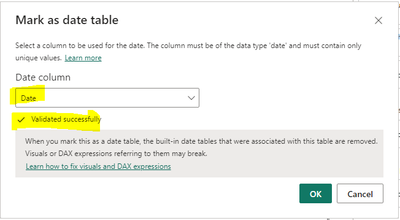
So when I have this new column "Date", I think I can mark my table as date table. Although it is validated sucessfully I received this error ->
and this after click "Ok"
After googling, found this "old" thread in this forum as well -> https://community.fabric.microsoft.com/t5/Desktop/Not-able-to-click-OK-in-Mark-as-date-table-dialogu...
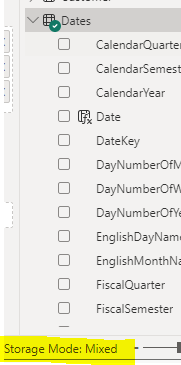
which mentioned that we need to switch the storage mode to Dual. First of all, am I right to say this is mean Mixed mode ?
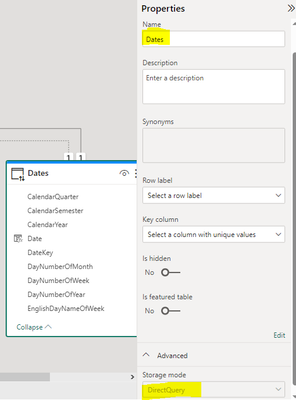
But actually my model already Mixed, although the Date table it self is "DirectQuery" and it looks like I cannot change it.
May I know how to solve this ?
Thanks.
Solved! Go to Solution.
Hi @KenMann
The calculated column is based on other columns, so it cannnot be set as a primary key, but you can refer to the following soution.
Create a calcualted table, use the date calculated column you have created.
e.g
Table=Summarize('Dates',[Date])
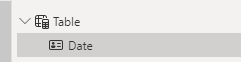
Then you can set this [Date] column of the new table as a Date table, it can work. and you can refer to the following attachments.
Best Regards!
Yolo Zhu
If this post helps, then please consider Accept it as the solution to help the other members find it more quickly.
Hi @KenMann
The calculated column is based on other columns, so it cannnot be set as a primary key, but you can refer to the following soution.
Create a calcualted table, use the date calculated column you have created.
e.g
Table=Summarize('Dates',[Date])
Then you can set this [Date] column of the new table as a Date table, it can work. and you can refer to the following attachments.
Best Regards!
Yolo Zhu
If this post helps, then please consider Accept it as the solution to help the other members find it more quickly.
Create your date column in Power Query, not in DAX.
If you have recently started exploring Fabric, we'd love to hear how it's going. Your feedback can help with product improvements.
A new Power BI DataViz World Championship is coming this June! Don't miss out on submitting your entry.
Share feedback directly with Fabric product managers, participate in targeted research studies and influence the Fabric roadmap.
| User | Count |
|---|---|
| 5 | |
| 3 | |
| 3 | |
| 2 | |
| 2 |
| User | Count |
|---|---|
| 10 | |
| 8 | |
| 7 | |
| 7 | |
| 5 |