FabCon is coming to Atlanta
Join us at FabCon Atlanta from March 16 - 20, 2026, for the ultimate Fabric, Power BI, AI and SQL community-led event. Save $200 with code FABCOMM.
Register now!- Power BI forums
- Get Help with Power BI
- Desktop
- Service
- Report Server
- Power Query
- Mobile Apps
- Developer
- DAX Commands and Tips
- Custom Visuals Development Discussion
- Health and Life Sciences
- Power BI Spanish forums
- Translated Spanish Desktop
- Training and Consulting
- Instructor Led Training
- Dashboard in a Day for Women, by Women
- Galleries
- Data Stories Gallery
- Themes Gallery
- Contests Gallery
- QuickViz Gallery
- Quick Measures Gallery
- Visual Calculations Gallery
- Notebook Gallery
- Translytical Task Flow Gallery
- TMDL Gallery
- R Script Showcase
- Webinars and Video Gallery
- Ideas
- Custom Visuals Ideas (read-only)
- Issues
- Issues
- Events
- Upcoming Events
Get Fabric Certified for FREE during Fabric Data Days. Don't miss your chance! Request now
- Power BI forums
- Forums
- Get Help with Power BI
- Power Query
- Re: Managing the use of a multiplier that changes ...
- Subscribe to RSS Feed
- Mark Topic as New
- Mark Topic as Read
- Float this Topic for Current User
- Bookmark
- Subscribe
- Printer Friendly Page


- Mark as New
- Bookmark
- Subscribe
- Mute
- Subscribe to RSS Feed
- Permalink
- Report Inappropriate Content
Managing the use of a multiplier that changes over time
Hello, community!
I'm looking for a way to manage the calculation of a metric that is affected by a multiplier. Imagine that I have a Sales Table and for each Sale a multiplier is considered to multiply the Sales Amount for every Salesman in order to calculate their Commision. I already have a Calendar Table, but I'm not finding a way to manage how to match the Sale Date to the multiplier that it should be affected by given that this multiplier is UNIQUE for each Salesman in a given (and not regular) period of time.
Imagine my Comission multipliers having these characteristics:
| Salesman | Applies to Sales from | Applies to Sales to | Comission |
| Salesman 1 | 1/Jan/2021 | 05/May/2021 | 0.85 |
| Salesman 2 | 1/Jan/2021 | 07/Jun/2021 | 0.78 |
| Salesman 3 | 1/Jan/2021 | 02/Jul/2021 | 0.65 |
| Salesman 1 | 06/May/2021 | 31/Dic/2021 | 0.89 |
| Salesman 2 | 08/Jun/2021 | 31/Dic/2021 | 0.87 |
| Salesman 3 | 03/Jul/2021 | 31/Dic/2021 | 0.76 |
| Salesman 1 | 1/Jan/2022 | 16/May/2022 | 0.85 |
| Salesman 2 | 1/Jan/2022 | 21/Jun/2022 | 0.78 |
| Salesman 3 | 1/Jan/2022 | 07/Jul/2022 | 0.65 |
| Salesman 1 | 17/May/2022 | 31/Dic/2022 | 0.89 |
| Salesman 2 | 22/Jun/2022 | 31/Dic/2022 | 0.87 |
| Salesman 3 | 08/Jul/2022 | 31/Dic/2022 | 0.76 |
As you can see, the periods are not regular and I need to create a YEARLY visual that matches the sales for each day of the year with its corresponding commision and its corresponding Salesman. Is there any way to achieve this?
I would really appreciate your help with this regard and thanks in advance for doing so!
Solved! Go to Solution.


- Mark as New
- Bookmark
- Subscribe
- Mute
- Subscribe to RSS Feed
- Permalink
- Report Inappropriate Content
Hi @GerardoRTobar,
Would "unpivoting" dates this way help?
let
    Source = Table.FromRows(Json.Document(Binary.Decompress(Binary.FromText("hZAxD8IgEEb/imHuGe9IOdydmjg5Nh2I6YYsxsF/r1jwSmnCdmle+F7fOKqb8/Pz4cIBVacQBheA4tnD1b2X83S0vZq6FUslyzC8QmbZlqwuWfqyPrNm8278amRYI1zm+1/iXEtYWd7AXFtomS5hNrVGUv79aVKiVot4Ei5K1IpBKZzP7F4MZJlu1yCS7XYOK+N1jukD", BinaryEncoding.Base64), Compression.Deflate)), let _t = ((type nullable text) meta [Serialized.Text = true]) in type table [Salesman = _t, #"Applies to Sales from" = _t, #"Applies to Sales to" = _t, Comission = _t]),
    #"Changed Type" = Table.TransformColumnTypes(Source,{{"Salesman", type text}, {"Applies to Sales from", type date}, {"Applies to Sales to", type date}, {"Comission", type number}}),
    #"Added Custom" = Table.AddColumn(#"Changed Type", "Range", each {Number.From([Applies to Sales from])..Number.From([Applies to Sales to])}),
    #"Expanded Range" = Table.ExpandListColumn(#"Added Custom", "Range"),
    #"Changed Type1" = Table.TransformColumnTypes(#"Expanded Range",{{"Range", type date}})
in
    #"Changed Type1"
Or you need this be solved in DAX rather than PQ?
Cheers,
John
- Mark as New
- Bookmark
- Subscribe
- Mute
- Subscribe to RSS Feed
- Permalink
- Report Inappropriate Content
Hi @GerardoRTobar,
You should not need the file. Just copy and paste the code above in the bank query. It should work.
Create a bank query:
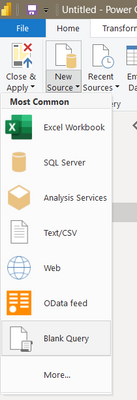
Open it in the editor:
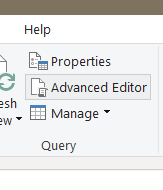
And then copy/paste the code in the editor and press Ok.
Kind regards,
John
- Mark as New
- Bookmark
- Subscribe
- Mute
- Subscribe to RSS Feed
- Permalink
- Report Inappropriate Content
Hi @GerardoRTobar,
Would "unpivoting" dates this way help?
let
    Source = Table.FromRows(Json.Document(Binary.Decompress(Binary.FromText("hZAxD8IgEEb/imHuGe9IOdydmjg5Nh2I6YYsxsF/r1jwSmnCdmle+F7fOKqb8/Pz4cIBVacQBheA4tnD1b2X83S0vZq6FUslyzC8QmbZlqwuWfqyPrNm8278amRYI1zm+1/iXEtYWd7AXFtomS5hNrVGUv79aVKiVot4Ei5K1IpBKZzP7F4MZJlu1yCS7XYOK+N1jukD", BinaryEncoding.Base64), Compression.Deflate)), let _t = ((type nullable text) meta [Serialized.Text = true]) in type table [Salesman = _t, #"Applies to Sales from" = _t, #"Applies to Sales to" = _t, Comission = _t]),
    #"Changed Type" = Table.TransformColumnTypes(Source,{{"Salesman", type text}, {"Applies to Sales from", type date}, {"Applies to Sales to", type date}, {"Comission", type number}}),
    #"Added Custom" = Table.AddColumn(#"Changed Type", "Range", each {Number.From([Applies to Sales from])..Number.From([Applies to Sales to])}),
    #"Expanded Range" = Table.ExpandListColumn(#"Added Custom", "Range"),
    #"Changed Type1" = Table.TransformColumnTypes(#"Expanded Range",{{"Range", type date}})
in
    #"Changed Type1"
Or you need this be solved in DAX rather than PQ?
Cheers,
John
- Mark as New
- Bookmark
- Subscribe
- Mute
- Subscribe to RSS Feed
- Permalink
- Report Inappropriate Content
Regarding this original solution you suggested (which works fine!), is there a way to do it via DAX? I mean, the other one works fine but I think is not efficient because it produces one row per every combination, so I don't know if there's a DAX way to achieve the same result?
- Mark as New
- Bookmark
- Subscribe
- Mute
- Subscribe to RSS Feed
- Permalink
- Report Inappropriate Content
Hi @GerardoRTobar,
Sorry, I can't figure it out how to do it in DAX. But to be perfectly honest, I am not much familiar with DAX.
Do you want to try to post your question in this hread: https://community.powerbi.com/t5/DAX-Commands-and-Tips/bd-p/DAXCommands ?
Kind regards,
John
- Mark as New
- Bookmark
- Subscribe
- Mute
- Subscribe to RSS Feed
- Permalink
- Report Inappropriate Content
I actually posted it here in PowerQuery thinking it would need some data prep stuff... But any solutions is welcomed!
Can you instead share a PowerBI file to open and test it?
- Mark as New
- Bookmark
- Subscribe
- Mute
- Subscribe to RSS Feed
- Permalink
- Report Inappropriate Content
Hi @GerardoRTobar,
You should not need the file. Just copy and paste the code above in the bank query. It should work.
Create a bank query:
Open it in the editor:
And then copy/paste the code in the editor and press Ok.
Kind regards,
John
- Mark as New
- Bookmark
- Subscribe
- Mute
- Subscribe to RSS Feed
- Permalink
- Report Inappropriate Content
I already tested your solutions and it works as intended!! Magnificent. Thanks a lot, buddy!

Helpful resources

Power BI Monthly Update - November 2025
Check out the November 2025 Power BI update to learn about new features.

Fabric Data Days
Advance your Data & AI career with 50 days of live learning, contests, hands-on challenges, study groups & certifications and more!

FabCon Atlanta 2026
Join us at FabCon Atlanta, March 16-20, for the ultimate Fabric, Power BI, AI and SQL community-led event. Save $200 with code FABCOMM.

| User | Count |
|---|---|
| 10 | |
| 9 | |
| 6 | |
| 5 | |
| 3 |


