cancel
Showing results for 
Search instead for 
Did you mean: 

July 7 - July 17 | Round 2 of the Power BI Dataviz World Championships. Don't miss your chance! Learn more

Reply
Kds1113
Helper I
Helper I

List Sum except specific value

I have a table that looks something like this: 


CategoryLocation 1Location 2 
Cat 15175.61725.2
Cat 29004.63001.533
Cat 33178.61059.533
Cat 456851895
Cat 57400.82466.933
Cat 61008.8336.2667
Cat 7708.8236.2667
Cat 816868.25622.733
Cat 984422814
Cat 1084022800.667

I want to create a column that sums Location 1 by all values except Category 8.  I don't want to filter out Category 8 as I'll need those values for the calculations of another column.


I tried nesting a table.selectrows within a List.Sum, but that didn't give me what I need. 


List.Sum(Table.SelectRows(#"Added Custom", each not ([Category] = "Cat8")))

1 ACCEPTED SOLUTION
edhans
Community Champion
Community Champion

Your basic idea is correct. The below works:


List.Sum(Table.SelectRows(#"Changed Type", each [Category] <> "Cat 8")[Location 1])


You need to include the field you want to sum at the end. Appending [Location 1] tells it what column of the filtered table to sum.
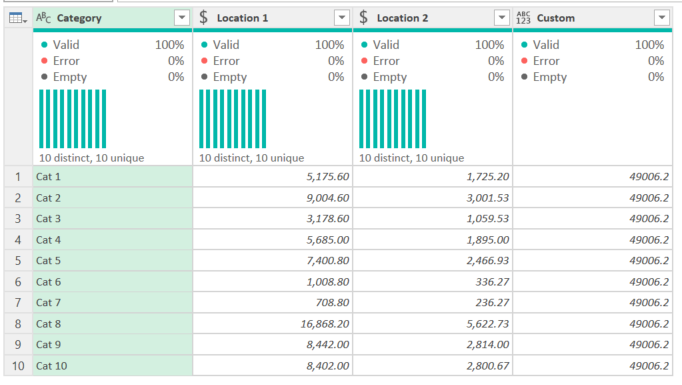
edhans_0-1670966926490.png


Full code:


let
    Source = Table.FromRows(Json.Document(Binary.Decompress(Binary.FromText("XY8xDsIwDEWvUmWuLNtJbGdm5QZVhwohxEIl1IXbE6coFDbnvfzvZJrCadmut/X5CmM4r5dlu6+PgY4HHsI8tnuNZ9IMUgdSzsDdcUUFMTUXEQlyjN1Gh6S2JzGXH5u8Vyy7s5I7d6AJEawOnESgHFJ7FVqzMQqwiHarnv1I/pcOSUwMuK1mBj00lwotJXdslL7/xyZwF/VdrXN+Aw==", BinaryEncoding.Base64), Compression.Deflate)), let _t = ((type nullable text) meta [Serialized.Text = true]) in type table [#"(blank)" = _t, #"(blank).1" = _t, #"(blank).2" = _t]),
    #"Promoted Headers" = Table.PromoteHeaders(Source, [PromoteAllScalars=true]),
    #"Changed Type" = Table.TransformColumnTypes(#"Promoted Headers",{{"Location 1", Currency.Type}, {"Location 2 ", Currency.Type}}),
    #"Added Custom" = Table.AddColumn(#"Changed Type", "Custom", each List.Sum(Table.SelectRows(#"Changed Type", each [Category] <> "Cat 8")[Location 1]))
in
    #"Added Custom"


 How to use M code provided in a blank query:
1) In Power Query, select New Source, then Blank Query
2) On the Home ribbon, select "Advanced Editor" button
3) Remove everything you see, then paste the M code I've given you in that box.
4) Press Done
5) See this article if you need help using this M code in your model.


Did I answer your question? Mark my post as a solution!
Did my answers help arrive at a solution? Give it a kudos by clicking the Thumbs Up!

DAX is for Analysis. Power Query is for Data Modeling


Proud to be a Super User!

MCSA: BI Reporting

View solution in original post

2 REPLIES 2
edhans
Community Champion
Community Champion

Your basic idea is correct. The below works:


List.Sum(Table.SelectRows(#"Changed Type", each [Category] <> "Cat 8")[Location 1])


You need to include the field you want to sum at the end. Appending [Location 1] tells it what column of the filtered table to sum.

edhans_0-1670966926490.png


Full code:


let
    Source = Table.FromRows(Json.Document(Binary.Decompress(Binary.FromText("XY8xDsIwDEWvUmWuLNtJbGdm5QZVhwohxEIl1IXbE6coFDbnvfzvZJrCadmut/X5CmM4r5dlu6+PgY4HHsI8tnuNZ9IMUgdSzsDdcUUFMTUXEQlyjN1Gh6S2JzGXH5u8Vyy7s5I7d6AJEawOnESgHFJ7FVqzMQqwiHarnv1I/pcOSUwMuK1mBj00lwotJXdslL7/xyZwF/VdrXN+Aw==", BinaryEncoding.Base64), Compression.Deflate)), let _t = ((type nullable text) meta [Serialized.Text = true]) in type table [#"(blank)" = _t, #"(blank).1" = _t, #"(blank).2" = _t]),
    #"Promoted Headers" = Table.PromoteHeaders(Source, [PromoteAllScalars=true]),
    #"Changed Type" = Table.TransformColumnTypes(#"Promoted Headers",{{"Location 1", Currency.Type}, {"Location 2 ", Currency.Type}}),
    #"Added Custom" = Table.AddColumn(#"Changed Type", "Custom", each List.Sum(Table.SelectRows(#"Changed Type", each [Category] <> "Cat 8")[Location 1]))
in
    #"Added Custom"


 How to use M code provided in a blank query:
1) In Power Query, select New Source, then Blank Query
2) On the Home ribbon, select "Advanced Editor" button
3) Remove everything you see, then paste the M code I've given you in that box.
4) Press Done
5) See this article if you need help using this M code in your model.


Did I answer your question? Mark my post as a solution!
Did my answers help arrive at a solution? Give it a kudos by clicking the Thumbs Up!

DAX is for Analysis. Power Query is for Data Modeling


Proud to be a Super User!

MCSA: BI Reporting

Perfect!  thanks for the quick reply!

Helpful resources

Announcements
FabCon and SQLCon Barcelona 2026

FabCon & SQLCon – Barcelona 2026

Join us in Barcelona for FabCon and SQLCon, the Fabric, Power BI, SQL, and AI community event. Save €200 with code FABCMTY200.

60 days of Data Days Carousel

Data Days 2026

Join Data Days 2026: 60 days of free live/on-demand sessions, challenges, study groups, and certification opportunities.

Power BI DataViz World Championships carousel

Power BI DataViz World Championships - June 2026

A new Power BI DataViz World Championship is coming this June! Don't miss out on submitting your entry.

Top Solution Authors