Get certified for free when you join Fabric Data Days 2026 and dive into Fabric, Power BI, SQL, AI, and other essential data skills.
Join nowJuly 28 - August 9 | Final Round of the Power BI Dataviz World Championships. This is your chance. Learn more
I have a table that looks something like this:
| Category | Location 1 | Location 2 |
| Cat 1 | 5175.6 | 1725.2 |
| Cat 2 | 9004.6 | 3001.533 |
| Cat 3 | 3178.6 | 1059.533 |
| Cat 4 | 5685 | 1895 |
| Cat 5 | 7400.8 | 2466.933 |
| Cat 6 | 1008.8 | 336.2667 |
| Cat 7 | 708.8 | 236.2667 |
| Cat 8 | 16868.2 | 5622.733 |
| Cat 9 | 8442 | 2814 |
| Cat 10 | 8402 | 2800.667 |
I want to create a column that sums Location 1 by all values except Category 8. I don't want to filter out Category 8 as I'll need those values for the calculations of another column.
I tried nesting a table.selectrows within a List.Sum, but that didn't give me what I need.
List.Sum(Table.SelectRows(#"Added Custom", each not ([Category] = "Cat8")))
Solved! Go to Solution.
Your basic idea is correct. The below works:
List.Sum(Table.SelectRows(#"Changed Type", each [Category] <> "Cat 8")[Location 1])
You need to include the field you want to sum at the end. Appending [Location 1] tells it what column of the filtered table to sum.
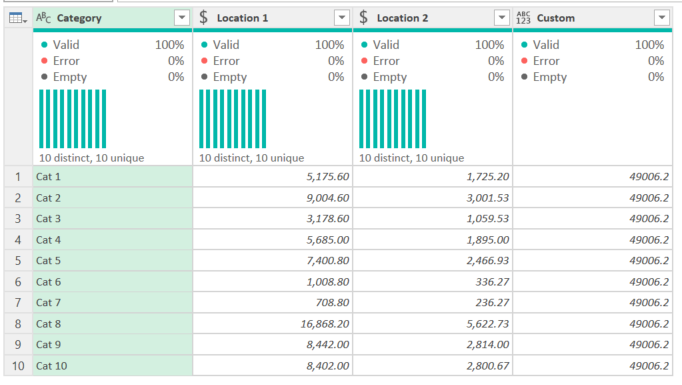
Full code:
let
Source = Table.FromRows(Json.Document(Binary.Decompress(Binary.FromText("XY8xDsIwDEWvUmWuLNtJbGdm5QZVhwohxEIl1IXbE6coFDbnvfzvZJrCadmut/X5CmM4r5dlu6+PgY4HHsI8tnuNZ9IMUgdSzsDdcUUFMTUXEQlyjN1Gh6S2JzGXH5u8Vyy7s5I7d6AJEawOnESgHFJ7FVqzMQqwiHarnv1I/pcOSUwMuK1mBj00lwotJXdslL7/xyZwF/VdrXN+Aw==", BinaryEncoding.Base64), Compression.Deflate)), let _t = ((type nullable text) meta [Serialized.Text = true]) in type table [#"(blank)" = _t, #"(blank).1" = _t, #"(blank).2" = _t]),
#"Promoted Headers" = Table.PromoteHeaders(Source, [PromoteAllScalars=true]),
#"Changed Type" = Table.TransformColumnTypes(#"Promoted Headers",{{"Location 1", Currency.Type}, {"Location 2 ", Currency.Type}}),
#"Added Custom" = Table.AddColumn(#"Changed Type", "Custom", each List.Sum(Table.SelectRows(#"Changed Type", each [Category] <> "Cat 8")[Location 1]))
in
#"Added Custom"
How to use M code provided in a blank query:
1) In Power Query, select New Source, then Blank Query
2) On the Home ribbon, select "Advanced Editor" button
3) Remove everything you see, then paste the M code I've given you in that box.
4) Press Done
5) See this article if you need help using this M code in your model.
DAX is for Analysis. Power Query is for Data Modeling
Proud to be a Super User!
MCSA: BI ReportingYour basic idea is correct. The below works:
List.Sum(Table.SelectRows(#"Changed Type", each [Category] <> "Cat 8")[Location 1])
You need to include the field you want to sum at the end. Appending [Location 1] tells it what column of the filtered table to sum.
Full code:
let
Source = Table.FromRows(Json.Document(Binary.Decompress(Binary.FromText("XY8xDsIwDEWvUmWuLNtJbGdm5QZVhwohxEIl1IXbE6coFDbnvfzvZJrCadmut/X5CmM4r5dlu6+PgY4HHsI8tnuNZ9IMUgdSzsDdcUUFMTUXEQlyjN1Gh6S2JzGXH5u8Vyy7s5I7d6AJEawOnESgHFJ7FVqzMQqwiHarnv1I/pcOSUwMuK1mBj00lwotJXdslL7/xyZwF/VdrXN+Aw==", BinaryEncoding.Base64), Compression.Deflate)), let _t = ((type nullable text) meta [Serialized.Text = true]) in type table [#"(blank)" = _t, #"(blank).1" = _t, #"(blank).2" = _t]),
#"Promoted Headers" = Table.PromoteHeaders(Source, [PromoteAllScalars=true]),
#"Changed Type" = Table.TransformColumnTypes(#"Promoted Headers",{{"Location 1", Currency.Type}, {"Location 2 ", Currency.Type}}),
#"Added Custom" = Table.AddColumn(#"Changed Type", "Custom", each List.Sum(Table.SelectRows(#"Changed Type", each [Category] <> "Cat 8")[Location 1]))
in
#"Added Custom"
How to use M code provided in a blank query:
1) In Power Query, select New Source, then Blank Query
2) On the Home ribbon, select "Advanced Editor" button
3) Remove everything you see, then paste the M code I've given you in that box.
4) Press Done
5) See this article if you need help using this M code in your model.
DAX is for Analysis. Power Query is for Data Modeling
Proud to be a Super User!
MCSA: BI ReportingPerfect! thanks for the quick reply!
Join us in Barcelona for FabCon and SQLCon, the Fabric, Power BI, SQL, and AI community event. Save €200 with code FABCMTY200.
If you love stickers, then you will definitely want to check out our community sticker challenge, Barcelona edition!
Check out the July 2026 Power BI update to learn about new features.
| User | Count |
|---|---|
| 4 | |
| 2 | |
| 2 | |
| 2 | |
| 1 |